Possible Instant Messaging Malware Attack Using Unicode Right-to-Left Override
[Bontchev21a] Springer, Studies in Big Data 84, 2021, pp. 179–191.
Abstract: The right-to-left special Unicode character has a legitimate use for languages that are transcribed in a right-to-left direction or in an environment that combines both right-to-left and left-to-right languages, like web pages, emails, desktop documents and text messages. These writing systems include right-to-left languages such as Persian, Arabic and Hebrew. The “right-to-left” attacks have been used for many years for malicious purposes, mostly in email communications. Early in 2018, Kaspersky Lab published an article [15], in which they described a vulnerability in the Windows client of the popular instant messenger Telegram. This vulnerability uses the Unicode “right-to-left” character to obfuscates the name of the malware file. In our paper, we shall describe a possible attack that we discovered and that uses a combination of the “right-to-left” override attack and instant messaging malware attack and presents a realistic threat for another widely used messenger - Microsoft’s Skype for Linux. Our purpose for conducting this research was to describe an exploit that we discovered and to warn the people who use this communication application about it, as well as to appeal to the producer for fixing it. Additionally, it is important to emphasize that the attack scenario developed by us also impacts other applications that allow file transfer (e.g., e-mail clients) and run on Linux systems with Wine installed.
Keywords: Instant messaging malware attack, Right-to-left Unicode override, File name obfuscation, Microsoft Skype for Linux, Wine
1 Introduction
1.1 Right-to-left override used for spoofing
This type of attack is not new. It is not limited to a specific operation system. We shall describe the danger it represents and how it is possible to exploit it for sending malware on Linux. In the past, this method has been used in Mac OS X and Windows OS, too.
First, let us explain the meaning of the “right-to-left” override. As shown in the official Unicode documentation [1] “right-to-left” is a special non-printing character, called “RIGHT-TO-LEFT OVERRIDE” (commonly abbreviated as RLO). Its Unicode number is U+202E. As shown in Table 1, there are several Unicode format characters related to language writing systems that serve as invisible operators used to control the text appearance.
Table 1. Unicode writing systems format characters [1]
| Unicode number | Name | Abbr. | Usage [2] |
| 200C | ZERO WIDTH NON-JOINER | ZWNJ | Breaks leading and trailing characters. |
| 200D | ZERO WIDTH JOINER | ZWJ | Joins leading and trailing characters. |
| 200E | LEFT-TO-RIGHT MARK | LRM | Acts as a Latin character. |
| 200F | RIGHT-TO-LEFT MARK | RLM | Acts as an Arabic character. |
| 202A | LEFT-TO-RIGHT EMBEDDING | LRE | Treats following text as embedded left-to-right. |
| 202B | RIGHT-TO-LEFT EMBEDDING | RLE | Treats following text as embedded right-to-left. |
| 202C | POP DIRECTIONAL FORMATTING | Restores direction previous to LRE, RLE, RLO, LRO. | |
| 202D | LEFT-TO-RIGHT OVERRIDE | LRO | Forces following characters left-to-right. |
| 202E | RIGHT-TO-LEFT OVERRIDE | RLO | Forces following characters right-to-left. |
Their legitimate usage refers to languages that use a right-to-left writing system, e.g., Persian, Arabic, or Hebrew. When these languages are used by a web page or desktop application, together with a text written in a left-to-right language, they need to be displayed correctly.
The Unicode character U+202E instructs the rendering software to display the text after that character in right-to-left direction. This can be used for malicious purposes if the file name is modified to include a right-to-left overriding character and is then attached to a carrier like email. For instance, if the file name is “myxtxt.exe” and if RLO character is placed after the first “x” (i.e., “myx*U+202E*txt.exe”), the file name will be displayed as “myxexe.txt”.
A section on the official Unicode site, named “Unicode Security Considerations”, describes that it is possible to use bidirectional text spoofing [3] in IRI (Internationalized Resource Identifier) scheme, as well.
Usually, the “right-to-left” override attack is conducted via email attachments or links for downloading files and is used on phishing websites or for sending malware.
1.2 Instant messaging spoofing
When talking about instant messaging spoofing, people usually mean an instant messaging phishing attack. For more than ten years, instant messaging clients have been targeted by this type of phishing [4]. It relies on the fact that if the victim receives an instant message from someone on their contact list, they are likely to click on the link contained in the message and leading to a phishing or an otherwise malicious website. The site would then request that the victim enters their credentials associated with their instant messenger account. The account of the sender of the phishing message could have been compromised by the attacker because, e.g., it had been protected with a weak password [5], or the password had been phished using a similar attack, or the password had been stolen by malware.
This way instant messengers become a vector for a type of attack called “social phishing” with the victim “purportedly getting a phishing message from someone they know” [4].
2 Related “right-to-left” override based threats that have inspired our research
2.1 Review of past “right-to-left” override attacks, conducted via emails or file downloads
As mentioned above, file name obfuscation with RLO characters is not anything new. For instance, back in 2005 [6], [7] phishing emails were using the “right-to-left” attack, in order to sneak past spam filters. In 2009 a Mozilla Foundation Security Advisory warned that the names of the downloaded files are spoofed with RTL override and when “downloading a file containing a right-to-left override character (RTL) in the filename, the name displayed in the dialog title bar conflicts with the name of the file shown in the dialog body”[8]. This vulnerability can be used to obfuscate the filename extensions. When such a file is downloaded and opened, it can result in the user running an executable file instead of opening the non-executable file that it pretends to be. In 2011 Brian Krebs in [9] described how the “right-to-left” override attack can “disguise malicious executable files (.exe) as relatively harmless documents, such as text or Microsoft Word files” delivered by emails. In 2013 F-Secure published an article about “signed Mac malware using right-to-left override trick” [10] to obfuscate application files as PDF files. In 2015 Talos Security Intelligence and Research Group wrote about a Remote Access Trojan (RAT) named DarkKomet (DarkComet), delivered by a spam campaign, attempting to obfuscate its own name again by using the RLO method [11].
It is worth mentioning that the same “right-to-left” override attack has been used against “activists, opposition members, and nongovernmental organizations in the Middle East” [12-1] for years. As described in [12], these are files with the DarkComet RAT payload, spyware, and C&C (Command and Control) servers affiliated with the government. The attack used some ideologically or movement-relevant files like a “document or a PE [executable file] as download or attachment with accompanying encouragement to open or act on the material, often masquerading as legitimate PDF documents or inadvertently leaked regime programs. Frequent use of RLO [is] to disguise [the] true [file] extension (such as .exe or .scr)”[12-7].
As mentioned in [13] and [14], some software applications black-list this Unicode character in the name of the downloaded file. Also, some email applications block executable files and they cannot be attached to messages, including files with names, obfuscated with this technique. This protection can be bypassed, however, if the obfuscated files are placed inside an archive file like .zip, .rar or similar. Anti-virus and anti-malware programs also still detect these obfuscated files if their content is known as being malicious. But many Linux users do not have an anti-virus program installed on their machines because the number of malware threats to Linux-based operating systems is still much lower than the corresponding number of malware threats for Windows.
All these examples of attacks are conducted via emails or downloading files - not via instant messenger.
2.2 “Right-to-left” override attacks conducted via instant messenger
Early in 2018, Kaspersky Lab published a research article, in which they described a vulnerability in the Windows client of the popular instant messenger Telegram. They called it a “zero-day vulnerability in Telegram [where] cybercriminals exploited [a] Telegram flaw to launch multipurpose attacks” [15]. This newest example, which uses a “right-to-left” override attack and an instant messaging malware attack, shows that this combination represents a realistic threat.
In this attack, the attackers used the Unicode “right-to-left” character to obfuscate the names of the malicious files before sending them. The researchers discovered several cases where it was actually exploited. This included taking remote control of the victim’s machine and installing a cryptocurrency miner that used the system resources of the infected computer. As described in the previous section, the attackers were using similar approaches, obfuscating the file extensions like .exe, .src, and .rar, and pretending to be picture files like .jpeg and .jpg (name*U+202E*gpj.rar, name*U+202E*gpj.exe, photoadr*U+202E*gepj.scr, address*U+202E*gpj.scr).
The researchers have “informed the Telegram developers of the problem, and the vulnerability no longer occurs in Telegram’s products” [15].
3 Description of the discovered problem
3.1 Proof of concept
In this subsection we shall describe a possible attack that we discovered in another widely used messenger service - Microsoft’s Skype messenger for Linux.
Skype was founded by Nordic entrepreneurs in 2003 offering free instant messaging and cheap overseas calls online. It reached tens of millions of users then and became a really popular messenger so that it even became a verb [16]. It was acquired by Microsoft in 2011. The published number of Skype users has not been updated since 2016 when they were about 300 million [17]. But the “downloads of Skype’s Android app reached 1 billion in October” 2017 [16]. So Skype remains popular despite criticism from longstanding consumers and attempts to be more focused on the corporate market. Thanks to Microsoft’s work in AI and integrating Cortana in the chat interface, Skype can now translate calls into a dozen languages [17] [16]. Therefore it is important to draw attention to security problems that can exploit the Skype instant messenger.
The vulnerability exists only in the Linux versions of Skype. The purpose of this paper is to describe a real possible to exploit problem and to warn people who use this communication service about. Below we describe how a possible attack could be performed. To explain the exploit of the vulnerability, we have to prepare a harmless executable file (as a proof of concept) and then send it in an instant message.
3.1.1 Preparing obfuscated file
Unlike Windows, Linux presents a particular challenge to the attacker. In Linux, the “executability” of a file is not determined by the file extension but by one of the file attributes in the file system. Even if we succeed to trick the victim into downloading our malicious file, Skype will not set the executable attribute when saving it to the disk, so if the file has executable contents (e.g., if it is an ELF file), it will not be executed by opening it.
Therefore, we need to send a file, the contents of which will be treated as executable, even if the executable bit is not set in the file system. For instance, we could send a document containing macros, but in Linux there is a better alternative – Wine.
Wine was created 25 years ago and “is a compatibility layer capable of running Windows applications on several POSIX-compliant operating systems such as Linux, macOS, & BSD. Instead of simulating internal Windows logic like a virtual machine or emulator, Wine translates Windows API calls into POSIX calls on-the-fly, eliminating the performance and memory penalties of other methods” [18]. Because Wine is a free and open-source and allows computer programs such as application software and computer games developed for Microsoft Windows to run on POSIX-compliant operating systems, it is very popular and is widely used. We “can treat things like web traffic to WineHQ as a rough estimate of overall interest in the project” [19]. According to the statistics of WineHQ webpage usage for 2017, the hits on the page are more than 100 million [20]. Therefore, it is very likely that Wine is already present on the machine of the victim.
But what is even more important for our purposes, if Wine is installed, it will be used to launch any file with an EXE extension, without the file needing to have the executable attribute set. Although this attack is applicable also to other forms of file transfer like e-mail attachments, to the best of our knowledge, this attack against Linux users has not been discussed before.
As our proof-of-concept, we shall use the following Python script, named hexgpj.py (1). Line 1. changes the current directory to the user's home desktop. Line 2. creates a text file named he.txt there. Line 3. puts the string “some code here” in the file and, finally, line 4. closes the file.
| (1) |
os.chdir(expanduser("~")+'/Desktop') f = open('he.txt', 'a+') f.write('some code here') f.close() |
We shall use a Windows machine to create a Windows executable (EXE) file from this script. (It can be done directly on a Linux machine, but in that case we would have to install Python for Windows there and to run it via Wine.) First, we need to make sure that Python is installed on the Windows machine and, if not, to install it there – e.g., from [21].
We also need the utility pyinstaller. It can be installed on Windows machine like that:
pip install pyinstaller
Next, we shall create an executable file (shown in Fig. 1) from the hexpgj.py script with the pyinstaller utility:
pyinstaller -F -s --distpath . hexpgj.py
For improved obfuscation, we could also replace the default icon resource of the generated EXE file with the icon for JPG files. Assuming that we have such an icon in a file named icon.ico, the following command will generate a file named hexgpj.exe (shown in Fig. 2) with this icon:
pyinstaller -F -s --distpath . -i icon.ico hexpgj.py

Fig. 1 Executable file hexpgj.exe

Fig. 2 Executable file hexpgj.exe with changed icon
The next step is to obfuscate the file extension using a RLO character. Placing this character after the “hex” string in the filename will make Skype display the remaining string “pgj.exe” in reverse. On Ubuntu OS entering a Unicode character is easy by typing Ctr+Shift+U(code number) at the Console and pressing Enter or Space. This operation does not change the actual file type. The real file extension is still .exe. So in our example changing the file representation with “right-to-left” override character should be:
cp hexpgj.exe hex*Ctr+Shift+U202e*gpj.exe

Fig. 3 Prepared executable file hexpgj.exe looking like an image file named hexexe.jpg
The obfuscated file is shown in Fig. 3. If we highlight the file in the file manager (Fig. 4), we shall see that the status information is reversed, too. That is because the RLO character causes everything after “hex” to be reversed. To restore the original text display direction, we can use the U+202C code, which is the PDF (POP DIRECTIONAL FORMATTING) Unicode character:
cp hexpgj.exe hex*Ctr+Shift+U202e*gpj.exe*Ctr+Shift+U202c*
Now the status information is correctly displayed as shown in Fig. 5.
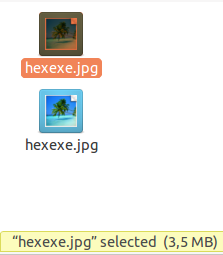
Fig. 4 Reversed status information
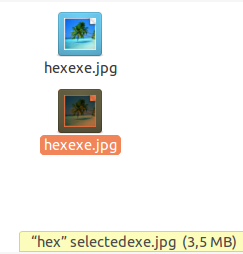
Fig. 5 Corrected status information
With these steps the obfuscated file is ready to be sent to the victim via a Skype message.
3.1.2 Launching an attack by sending an obfuscated file
Now the attacker can send a message and the victim will see an incoming image file named hexexe.jpg, instead of a suspicious executable file named hexgpj.exe. This is shown in Fig. 6 and Fig. 7.
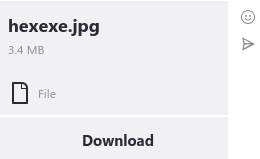
Fig. 6 Obfuscated file sent via Skype
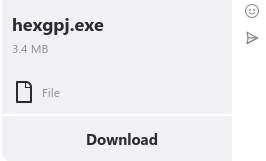
Fig. 7 Unobfuscated file sent via Skype
If the recipient clicks on “Download”, they will see one of the following messages. The first one, shown in Fig. 8 is displayed when U+202C is not used in the file name. The one shown in Fig. 9 is displayed if U+202C character is used and in this case the process of misleading the victim is compete.
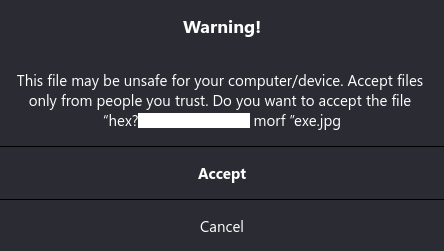
Fig. 8 The obfuscation is broken in the message
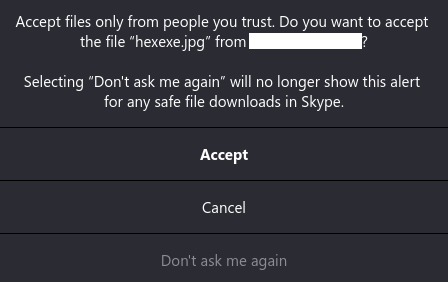
Fig. 9 The obfuscation is corrected in the message
If the filename obfuscation is incomplete (the right-to-left text display direction is not terminated with a U+202C character), then the message is shown as “Warning” because Skype sees that the file has an executable extension (.exe). Also, the Skype name of the sender (blanked on the picture for privacy reasons) is reversed just like the word “from” (resulting in “morf”). But in the Fig. 9 where the character U+202C is used to end the right-to-left displaying of the text in the file name, Skype thinks that this is a normal image file and offers to not show this message again.
When the victim clicks on “Download”, the file is downloaded and saved to the ~/Download folder by default. When examining this folder with a GUI file manager like Nautilus or Nemo, the file is shown as in Fig. 10. In some Linux distributions (e.g., Linux Mint with the Cinnamon desktop), the file icon is not handled correctly. There the icon is the standard icon for Wine executables as shown in Fig. 11. This seems to be a bug.
Fig. 10 Downloaded executable file hexpgj.exe looking like an image file named hexexe.jpg

Fig. 11 Downloaded executable file hexpgj.exe looking like an image file named hexexe.jpg but with a wrong icon
It is important to note that the downloaded executable file does not have the executable bit set (Fig. 12). However, if you double-click on its icon from the GUI file manager, Wine will launch it. Even better, after the downloading is complete, Skype offers to “Open” the file (Fig. 13). Clicking “Open” will result in Wine launching the file without any warring messages.

Fig. 12 Executable bit is not set
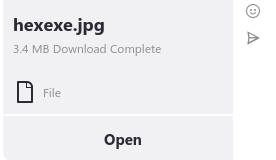
Fig. 13 Skype offers to open the obfuscated file
When the file is launched by Wine, a Terminal window will flash for a short moment, the file will run, and the code in (1) will be executed. This creates a text file named “he.txt” on the desktop of the user with the string 'some code here' in the file (Fig. 14). At this point the security of the victim is compromised.
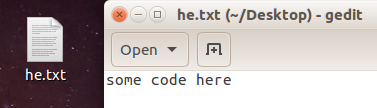
Fig. 14 Downloaded file creates this file with some text in it
There are two mitigating factors. First, the correct file extension is displayed in the Terminal (Fig. 12). It seems that Terminal ignores the “right-to-left” override character. But it is not common to open picture files from the Terminal. The second factor is that in the Cinnamon desktop environment, the icon file cannot be changed by the attacker (Fig. 11).
3.1.3 Possible consequences
Since this attack results in code, written by the attacker, being executed on the machine of the victim, the possible consequences from this attack are limited only by the imagination of the attacker who is exploiting this vulnerability.
Some realistic scenarios are, for instance, installing malware like Ransomware, Viruses, Remote Access Trojans (RATs), Cryptocurrency miners; destroying user data, stealing sensitive information and so on. Also, it is possible to install inappropriate files (like child pornography or stolen classified information) on the system of the victim and to accuse the latter of possession or to try to blackmail them. Alternatively, a trivial change to the script (1) could make it append the SSH public key of the attacker to the file ~/.ssh/authorized_keys of the victim, giving the attacker a backdoor (remote access) to the machine of the victim.
These are only some examples that are by no means an exhaustive list of the possible attacks exploiting this security problem.
3.2 Reporting the problem
Given the serious implications following from this vulnerability, we decided to contact Microsoft’s security service (Microsoft is the owner of Skype) and to report the problem to them. We presented them with a detailed description of the vulnerability, the steps needed to reproduce it, the affected platforms, the mitigating factors, the security implications, and a description of what had to be done, in order to fix it. Microsoft’s response was that: “Unfortunately your report appears to rely on social engineering to accomplish, which would not meet the bar for security servicing”.
The latest version of Skype for Linux at the time of the report (March 3, 2018) was 8.16.0.4 (from February 21, 2018) and all tests were conducted with it, too. But a three days after our report and their response, Microsoft rolled out a new release, 8.17.0.2. The release notes of version 8.17.0.2 specify as changes only the following: “Call international numbers with ease: International calls to mobiles and landlines is now quicker with the ability to select a country/region. From Calls, select the dial pad, and then choose the country/region you want to call from the drop-down” [22]. There is nothing mentioned there about the “right-to-left” override character vulnerability but our further experiments demonstrated that Microsoft has fixed it and the vulnerability no longer exists in Skype for Linux after this version.
4. Conclusion
The paper presents only those cases that we were able to test and experiment with. We do not have information which other versions of the Skype for Linux have been affected by this vulnerability. The contribution of our research is that it helped solving this security issue. Also note that this attack against Linux users is applicable to other forms of file transfer. For instance, it could be used to send malicious files as e-mail attachments and if the user tries to open the saved attachment, the malicious program will run. To the best of our knowledge, this attack against Linux users has not been discussed before.
Acknowledgments
The preparation of this paper is supported by the National Scientific Program “Information and Communication Technologies for a Single Digital Market in Science, Education and Security (ICT in SES)”, financed by the Ministry of Education and Science of the Republic of Bulgaria.
References
- "Unicode 10.0 Character Code Charts. General Punctuation Range: 2000–206F", accessed on May 2018. [Online]. Available: https://bit.ly/2IKJ9zT
- Woodvine, Stanley. "RLO spoofing is another Internet security reverse", December 2015, accessed on May 2018. [Online]. Available: https://bit.ly/2ImPjma
- Davis, M., M. Suignard. "Unicode Technical Report #36. Unicode Security Considerations. Bidirectional Text Spoofing", accessed on May 2018. [Online]. Available: https://bit.ly/2L2T6Hd
- Stavroulakis, Peter, and Mark Stamp, eds. Handbook of information and communication security. Springer Science & Business Media, 2010, p. 438. https://doi.org/10.1007/978-3-642-04117-4
- Boyd, Christopher. "Steer Clear of this Skype Spam", September 2015, accessed on May 2018. [Online]. Available: https://bit.ly/2KnKCcf
- Batchelder, Ned. "Phishing fun with Unicode", April 2005, accessed on May 2018. [Online]. Available: https://bit.ly/2IhpkAK
- Katz, Damien. "Worst Phisher Ever", April 2005, accessed on May 2018. [Online]. Available: https://bit.ly/2GfbkBy
- "Mozilla Foundation Security Advisory 2009-62. Download filename spoofing with RTL override", accessed on May 2018. [Online]. Available: http://bitly.com/2rL3haj
- Krebs, Brian. "‘Right-to-Left Override’ Aids Email Attacks", September 2011, accessed on May 2018. [Online]. Available: https://bit.ly/2L1w2bJ
- Brod, "Signed Mac Malware Using Right-to-Left Override Trick", F-secure Labs, July 2013, accessed on May 2018. [Online]. Available: https://bit.ly/2GhXr5u
- Biasini. Nick, "Threat Research. Ding! Your RAT has been delivered", July 2015, accessed on May 2018. [Online]. Available: https://bit.ly/2KpFzIi
- Marczak, William R., John Scott-Railton, Morgan Marquis-Boire, and Vern Paxson. "When Governments Hack Opponents: A Look at Actors and Technology." In USENIX Security Symposium, pp. 511-525. 2014. Available: http://www.icir.org/vern/papers/govhack.usesec14.pdf
- Arntz. Pieter, "The RTLO method", January 2014, accessed on May 2018. [Online]. Available: https://bit.ly/2rKcakz
- Chancel, Jordi. "Right to Left Override Unicode Can be Used for Multiple Spoofing Cases", accessed on May 2018. [Online]. Available: https://bit.ly/2Ill66U
- Firsh, Alexey. "Zero-day vulnerability in Telegram", February 2018, accessed on May 2018. [Online]. Available: https://bit.ly/2r0RrbB
- Bass, D., N. Lanxon. "Don't Skype Me: How Microsoft Turned Consumers Against a Beloved Brand", May 2018, accessed on May 2018. [Online]. Available: http://bitly.com/2jQgQSa
- "Skype has more than 300 million monthly active users, will get bots", accessed on May 2018. [Online]. Available: https://bit.ly/2lxPA9W
- "WineHQ", accessed on May 2018. [Online]. Available: https://www.winehq.org
- "WineHQ Usage Statistics", accessed on May 2018. [Online]. Available: https://bit.ly/2ImRPgs
- "Usage Statistics for WineHQ winehq.org", accessed on May 2018. [Online]. Available: https://bit.ly/2Kqcb4R
- "ActiveState - The Open Source Languages Company. ActivePython", accessed on May 2018. [Online]. Available: https://www.activestate.com/activepython
- "Release Notes for Skype for Desktop, Mac and Linux", accessed on May 2018. [Online]. Available: https://bit.ly/2L1Aqr9