SymbOS Malware Classification Problems
[Bontchev06b] Proc. 16th Int. Virus Bull. Conf., 2006, pp. 216–226.
Abstract: Since “smart” mobile phones running the Symbian operating system have become popular, so has the malware (mainly viruses and Trojan horses) for them. The peculiarities of this operating system, mainly related to how software for it can be distributed, have resulted in some interesting problems, arising when attempting to classify and identify exactly the malware for it. Although it is not likely that they are being intentionally exploited by the malware authors yet (and, in fact, they are sometimes exacerbated by these people’s stupidity and ignorance), these problems nevertheless cause some trouble (both theoretical and practical) to the anti-virus programs for this environment. This paper aims to examine all these problems in detail and to suggest ideas for their circumvention or resolution.
1 Introduction
In the past few years, the so-called “smart” phones have become immensely popular. In fact, some predict that, sooner or later, they will either replace the PDA or will merge with it in a single device. About 60% of the market belongs to the phones running various versions of the Symbian operating system. The popularity of the OS has resulted in it attracting the attention of the malware authors. And, indeed, since the first virus for this operating system, Cabir.A, appeared in June 2004 ([FS2004]), the number of various malware (mostly viruses and Trojan horses) for this environment has been increasing exponentially.
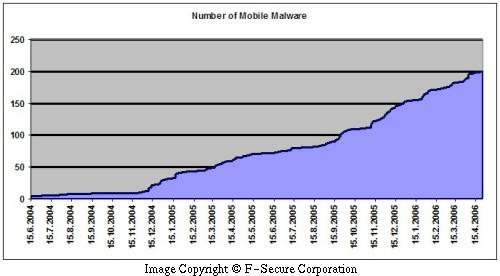 Figure 1
The chart on Figure 1, courtesy of F-Secure Corp. ([FS2006]), illustrates this disturbing trend. In fact, the chart is somewhat on the optimistic side. In reality, the situation is even worse. According to our own accounts, the number of known malware programs for Symbian OS (called SymbOS for short in the CARO Malware Naming Scheme, [CARO2005]) at the time of writing of this paper (May, 2006) exceeds 320.
While the total number of known SymbOS malware programs is still relatively small and the quality of these programs is still on the primitive side, the trend is disturbing. It must be noted that we are still at the very early stage of development here. The population of SymbOS devices is also nowhere near that of personal computers and their interconnection also cannot rival that of the PC. Although in some “well-telephonized” countries like Finland there have been cases when a single phone infected with a SymbOS virus that spreads through Bluetooth has caused an epidemic in a crowded stadium ([FS2005]), in less developed countries like Bulgaria one can hardly find more than 2-3 Bluetooth-enabled phones even at places like the national airport.
Still, as mentioned above, the trend is disturbing. Equally disturbing is the fact that SymbOS malware often has some peculiar properties that have caused all kinds of problems to the anti-virus researchers – problems, mostly related to the proper naming and classification of this malware.
2 The Problems
In this section, we shall examine the various classification problems posed by the SymbOS malware. Interestingly, most of them don’t seem to be caused intentionally by the malware authors. They are result, usually, of a combination of some interesting properties of the SymbOS environment and of the stupidity, ignorance and laziness of the malware authors.
2.1 The Core of the Problem
Most of the problems are a consequence of how software is installed on a device running the Symbian operating system. While the entry vectors are numerous – software packages can be sent to the device by USB cable, Bluetooth, infrared, e-mail, MMS and so on – the form of the package is always one and the same.
Unlike personal computers and other PDAs, one cannot simply send an executable file to a SymbOS device and expect it to be executed. What has to be sent to the device is a so-called SIS package. The closest analogy in the Windows PC world is an MSI installation package – except that MSI packages are only one of the possible ways to install software in Windows, while SIS packages are the only way to install native software on a Symbian device. (Java software in installed in a different way – as JAR files.)
A SIS package is essentially a kind of archive. It contains all files of the package that is being installed, with their paths, specifying where on the device they are to be installed. (Like DOS/Windows, Symbian supports a hierarchical file system with drives and subdirectories. Usually, drive C: is the device’s main RAM, drive D: is the cache, drives E: and higher are the removable memory cards installed on the device, and drive Z: is the ROM.) The only difference is that a SIS file might specify the special drive letter “!:” which means “allow the user to choose whether these files are to be installed in the main memory or on the memory card”.
The files are compressed, using the zlib “deflate” algorithm. In addition, the SIS file contains various information needed for the installation – an optional pop-up message to be displayed before installation, information about the required Symbian version and language locale, optional digital signatures, and so on. A SIS file can specify that some of the components in the package have to be executed (or installed) automatically, if the user permits the installation of the main package. We shall talk more about this “feature” in section 2.6.)
So, generally speaking, a software package that is supposed to be installed on a Symbian device, including malware programs, is not a single executable but a set of files. This “set of files” concept is what is causing most of the problems.
2.2 What Is SymbOS Malware?
Since, as explained in the previous section, SymbOS malware usually consists of many files (not all of them executable), we have decided to define a SymbOS malware program as a set of files – just as, in the macro malware world, we define macro malware as a set of macros. While this approach definitely makes sense, some things are not as simple as in the macro malware world.
For instance, not all files have to be executable. Some of them could contain various resources like icons (files with the extension AIF), pictures (JPG and MBM files; the latter is a proprietary graphic format used by Symbian), fonts (GDR files), and so on. It is important to note that just because a file does not contain executable code in Symbian does not mean that this file is not malicious. For instance, the Skulls Trojans change the icons of most ROM applications to that of a skull-and-bones icon, which is at least annoying. The BlankFont.A Trojan changes the system font with a blank one, which makes the device essentially unusable. Even a zero-length file can be malicious, if it is used to overwrite, at installation time, some important file on the device (e.g., an anti-virus program).
There are some other problems which the “set-of-files” concept causes to the anti-virus software; we shall talk more about that in section 3.3.4.)
2.3 Code Similarity Doesn’t Work Well
The art of malware writing for Symbian is still in its infancy. There are, relatively speaking, few Symbian programmers out there – and only a disappearingly small number of them write SymbOS malware. While we have seen some developments in this area, most currently known SymbOS malware it very primitive.
Even advanced viruses like Cabir or CommWarrior are clearly heavily based on textbook examples for sending files over Bluetooth and MMS, taken (often – literally) from the various Symbian software programming kits or manuals. And many of the variants of these viruses are essentially patches of the original variant’s text messages.
In other cases the malware, for instance the Skulls Trojan, is essentially a SIS package of multiple copies of a skulls-and-bones icon (AIF file), with the UID field in each of them changed to reflect the UID of some well-known Symbian system application. Since the OS uses the UID field (and not the file name or path) to determine to which application a particular resource file belongs, this essentially has the effect of changing the icons of the system applications.
Because of all this, the classification of SymbOS malware according to the similarity of its replication code, which is the foundation of the CARO Malware Naming scheme, does not work very well here. It is not that it doesn’t work at all – it is just that there are some difficulties applying it. For instance, how do you determine “code similarity” if the malicious SIS package contains no code at all?
2.4 Multi-Droppers
But even that primitive level of malware creation described in the previous section has proven beyond the abilities of many SymbOS malware authors. Being incapable of creating their own original Trojan or virus, being incapable of even patching the text messages in a known SymbOS malware program, they often create “new variants” by taking one or more known, old SymbOS malware programs and re-packaging them in new SIS files.
It could be argued whether packages that drop multiple already known malware variants should be classified as new variants on their own. For instance, in the macro virus world, a mixture of two known viruses in the same document is not considered a new variant – provided that this mixture can indeed be split entirely into known variants.
However, in the world of SymbOS malware things are a bit more complicated. The two (or more) known variants in the new SIS package can be dropped or installed in various different ways (see section 2.6). The different SIS files themselves can perform different (from the point of view of the user) actions at installation time – e.g., display different messages, install the known malware in different places, delete different files, and so on. Finally, they can also install other things besides the malware – e.g., legitimate software. Even if these other things are not malware, the user is unlikely to have installed them intentionally and probably wants them off his or her device at disinfection time, together with the malware. But the only way to ensure this is by including them in the definition of the malware.
Multi-droppers cause some other classification problems, too. A malicious SIS package could contain two other, already known SymbOS malware programs – but two malware programs that belong to two different families. Clearly, the new package is “equally similar” to either of these two families. So, into which family should it be classified? In one of the two (and which one?) – or in a third family?
A relatively lame “solution” to this problem has been adopted by some anti-virus products. They use (sometimes – rather indiscriminately) the special family name “Multidropper” and group in this “family” all SIS packages that drop more than one SymbOS malware program. However, such an approach has several problems.
First of all, it sort of defeats the whole purpose of organizing malware into families according to code similarity – the variants of this pseudo-family are often completely different. Second, such an approach is usually applicable only at SIS file level – i.e., not once the malware has been already installed on the device. But, as we shall see in section 2.10, identification at such a level is unreliable. Furthermore, it will lead to naming discrepancies e.g., the anti-virus program will report one name when scanning the SIS file and another name – when scanning a device, infected by this very same SIS file.
2.5 Multiple Droppers
As if the problem of multi-droppers described in section 2.4 wasn’t bad enough, we have also seen different SIS packages install one and the same malware. For instance, variants .O, .P, .T, .U, .X, .AB, .AD, .AE, .AH, .AK, .AL, .AN, .AQ, .AW, .BA, .BB, .BC, .BD, .BE, .BF, .BG and .BK of the Skulls family of Trojans are all constructed in one and the same way. Namely, somebody has taken 22 different legitimate packages and has added one and the same Skulls variant to them, so that it is installed automatically, when the main SIS package is installed (see also section 2.6). Essentially, these are Trojanized packages.
Again, it is arguable whether these constitute different variants or not. In the macro virus world, this problem does not exist. Legitimate macro packages are relatively rare and the malware authors have not come up with the “bright” idea of Trojanizing a couple of dozens of them with one and the same Trojan. If the malware inside were a virus capable of infecting SIS files (see also section 2.8), a case could be made that these are just 22 different SIS files infected with it. But in our case we have a Trojan – i.e., not a program that can replicate on its own, let alone infect SIS files. There is no way these could have appeared via “natural replication” – they were all intentionally constructed. And they are inarguably different. The disinfection process should be able to remove all components installed by each one of them – not just the common malicious one. Therefore, they have to be identified – i.e., distinguished from each other. Which means that they should be considered different variants.
There is another problem associated with this issue. The CARO naming scheme is simply not designed to cope with the concept of different droppers for the same malware program. Normally, droppers are considered a special class of malware (although the author prefers to consider them a kind of Trojans) – one which installs a virus. But that is not a problem – the definition can easily be extended to allow the installation of Trojans (or, in fact, of any other kind of malware) instead. The problem is that there is no logical way of naming multiple droppers for the same thing.
As it currently is, if there is a dropper which drops the malware virus://SymbOS/Foo.A, the CARO Malware Naming scheme postulates that it should be named dropper://SymbOS/Foo.A ([CARO2005]). That is, the malware type is changed to “dropper” and everything else (platform, family, variant) remains the same.
But what if there are two droppers for the same thing? We cannot name the second one dropper://SymbOS/Foo.B, because, by definition, that is the dropper of virus://SymbOS/Foo.B, so it clearly cannot be the dropper of virus://SymbOS/Foo.A. And if we decide to keep two separate, independent sequence of variant names for the droppers and for the malware they drop, this is only going to increase the confusion, because the name of the dropper will bear no clear indication of what it drops.
The currently adopted solutions again leave a lot to be desired. In the case of viruses (e.g., Cabir, CommWarrior) a new family of Trojans is constructed for the dropper. The name of this family is somewhat indicative of which virus family it drops (e.g., CDropper, CommDropper) and the variant name has no relationship to the virus variant that is being dropped. In the case of Trojans (e.g., Skulls), some use the same approach (e.g., SDropper), while others (including the author of this paper) prefer to classify them as different variants in the same Trojan family (i.e., Skulls).
2.6 Multiple Ways of Dropping
The problems described in sections 2.4 and 2.5 are exacerbated by the fact that SIS packages can “drop” malware in several different ways. We shall explore them in the next few subsections.
The reason why this exacerbates the problem is because it makes it even more difficult to decide whether two different SIS packages installing one and the same SymbOS malware contain the same variant or not. For instance, they could drop this malware in different locations or using different methods. This could result in the malware requiring different disinfection procedures (e.g., different directories will have to be deleted).
2.6.1 Executable Files
The simplest way of dropping is by using the standard abilities of a SIS package to install executables in specified directories.
While Symbian does not have the concept of startup menu or Run registry key like Windows, it is possible to make an executable run at boot time by creating a so-called “recognizer” – an MDL file (Symbian’s analogy of a DLL file in Windows) and installing it in the directory C:\System\Recogs. This would ensure that the malware will receive control at boot time and, possibly, remain running and in control of everything happening on the infected device.
Alternatively, the malware executable in the malicious SIS package could overwrite (or infect parasitically) “popular” programs that users often have installed in the memory of their phones.
In addition, the specification of the SIS files ([AT2006]) allows some of the installed executable files to be marked as “run on install” – that is, control is transferred to them immediately after the installation is finished. This, too, provides interesting capabilities that can be exploited by SymbOS malware. Besides being run on installation, an executable can be marked as being run on removal – or as being run both on installation and removal.
2.6.2 SIS Files
Another way in which malware can be dropped by a malicious SIS package is by dropping another SIS package (contained inside) into a directory, where the user will be likely to see it and attempt to “run” it. When the latter happens, Symbian will proceed with the installation of this new SIS file.
2.6.3 Automatic Installation of SIS Files
However, it is not necessary to wait for the user to attempt to run manually the dropped SIS file, as explained in subsection 2.6.2. Besides the concept of “run an executable file automatically on installation” (see subsection 2.6.1), Symbian also has the concept of “install a SIS file automatically on installation”. That is, a SIS package could contain inside another SIS component, marked in a special way. When the user attempts to install the parent SIS package, the SIS component contained inside will be extracted and installed automatically, too.
In fact, this seems to be the preferred way of producing Trojanized packages (see section 2.5) among the SymbOS malware authors.
2.7 Paths Matter
In addition to the problems described in the previous few sections, the proper identification and classification of SymbOS malware is made even more difficult by the fact that knowing only the contents of all the files installed by a malicious SIS package is not sufficient. One must also take their paths into account.
In fact, depending on its path, in Symbian one and the same file can be malicious or not. Here are a few examples:
-
The contents of a zero-length file clearly cannot have any malicious functions since, well, it is absent. However, if that same zero-length file is installed by a malicious SIS package using, for instance, the path C:\System\Apps\Anti-Virus\Anti-Virus.app, it will overwrite (and, therefore, disable) F-Secure Mobile Anti-Virus.
-
The ROM of every Symbian device contains several programs. Clearly, they are not malicious per se. However, they are often device-specific – in the sense that they will not work correctly on another device and might even crash and hang it, if run there. Yet several malicious SIS packages contain such files, lifted from the ROM of some phone. They install these images without ensuring that they are compatible with the device on which they are being installed. This clearly can cause damage and these (legitimate by contents but malicious by path) files will have to be removed by the anti-virus program at disinfection time.
-
The BlankFont.A Trojan consists of a single font file, all characters of which are blank (i.e., have the same foreground and background color). Now, a blank font can probably be even useful somewhere. But the SIS package containing this Trojan installs it so that it is used as the system font, making the device unusable. If the file was installed in a different directory, it wouldn’t have been recognized as a font file at all.
2.8 SIS File Infection
As we saw from the previous sections, both the contents and the file paths of the files installed by a malicious SIS package should be used, in order to identify exactly the malware inside. However, in some cases this is not so simple.
A typical example is the problem caused by the Lasco.A virus. This virus knows the format of the SIS files (this format is reasonably well-documented and the program that creates such files has been released by Symbian as open source) and has the ability of infecting any SIS files it finds on the device by adding to them as a sub-component a SIS file containing the virus and setting a flag, indicating that this added SIS file has to be installed automatically when the SIS file containing it is installed – i.e., using the technique described in subsection 2.6.3.
Continuing the analogy with the world of macro malware, this method bears some resemblance both to the pseudo-parasitic macro viruses (i.e., macro viruses that can infect parasitically other macros) and to the mass-mailing viruses (i.e., macro viruses that replicate all macros from the document they reside in and, as such, can convert to viruses any legitimate macro packages they happen to infect).
Technically, such infected SIS files are indistinguishable from Trojanized packages or droppers. The anti-virus program must know that the virus it has detected inside has the property to infect SIS files and treat it accordingly – i.e., remove it from the SIS file it has infected, instead of labeling the whole SIS file as malicious (or, worse, as a new variant).
The method used by this virus can be extended further in a rather straightforward way – instead of including an auto-installed SIS file, a virus could infect SIS files by modifying their structure so that they contain just the executable file(s) of the virus and install them in the right places. While no such virus exists yet, one is relatively easy to conceive and we shall, undoubtedly, see such an attack implemented in the future.
2.9 Packages Differing Only in Their Pop-Up Messages
The specification of the SIS file format ([AT2006]) indicates that the creator of a SIS package can specify a text message (in fact – a dialog) that can be displayed at installation time. This message resides in a text file inside the SIS package. However, it is not created or installed anywhere on the device. This raises another interesting classification problem.
Let us suppose that two different malicious SIS packages install exactly the same set of files (and in exactly the same directories, too). However, the first package contains one text message that is displayed at installation time, while the other SIS package contains a different message (or no message at all). Do these two SIS packages contain two different malware variants or not? It can be argued both ways.
On the one hand, they clearly have two different behaviors from the point of view of the user. Therefore, it makes sense to classify them as two different variants. On the other hand, however, the difference between them can be detected only when scanning the SIS files. When scanning the already infected device, the two variants are undistinguishable from each other. We shall discuss some related issues in subsection 3.3.1.
2.10 Different SIS Files Can Install the Same Thing
As we saw in the previous sections, two malicious SIS files can install exactly one and the same malicious executables, yet have very different behavior, depending on the way these executable files are installed, the directories where they are installed, and the message displayed during installation. The obvious conclusion is that for exact identification of SymbOS malware, one must identify exactly these components of the SIS files – contents and path of the installed files, as well as contents of the installation message.
Can’t we, then, identify the SIS packages externally – that is, as SIS files? Sadly, this is not the case.
Two SIS packages can install exactly the same files in exactly the same packages and display exactly the same installation message – yet be different as SIS files. This is because a SIS file is, essentially, an archive. It is sufficient, for instance, to swap the order to two of the files in this archive and it will result in a different SIS file, which will, nevertheless, install exactly the same thing in exactly the same places – just in different order. This is just an example; two SIS files installing the same thing can differ in other areas too.
This is not just a theoretical observation. We have already seen samples of SymbOS malware, which reside in different SIS files but which SIS files install exactly the same files in exactly the same places and have otherwise undistinguishable behavior.
Therefore, identifying SIS files externally (e.g., by checksumming the whole file) is unreliable. The anti-virus programs should examine their contents and identify the contents and the paths of the files inside, as well as the contents of the message displayed on installation and possibly some other information as well (e.g., any language or OS version dependencies).
2.11 Malware Combinations
Considering the various ways in which multiple known and unknown variants of viruses and Trojans could be combined in a new SIS package using some of the methods described in the previous sections, we were able to come up with 32 distinctly different possibilities. According to them, such a malicious SIS package could contain:
-
A known virus.
-
A known virus and other files.
-
A known Trojan.
-
A known Trojan and other files.
-
A new virus.
-
A new virus and other files.
-
A new Trojan.
-
A new Trojan and other files.
-
A known virus and a known Trojan.
-
A known virus, a known Trojan and other files.
-
A new virus and a known Trojan.
-
A new virus, a known Trojan and other files.
-
A new virus and a new Trojan.
-
A new virus, a new Trojan and other files.
-
A known virus and a new Trojan.
-
A known virus, a new Trojan and other files.
-
A combination of known viruses.
-
A combination of known viruses and other files.
-
A combination of known Trojans.
-
A combination of known Trojans and other files.
-
A combination of viruses, at least one of which is new.
-
A combination of viruses, at least one of which is new, and other files.
-
A combination of Trojans, at least one of which is new.
-
A combination of Trojans, at least one of which is new, and other files.
-
A combination of known viruses and known Trojans.
-
A combination of known viruses, known Trojans and other files.
-
A combination of viruses, at least one of which is new, and known Trojans.
-
A combination of viruses, at least one of which is new, known Trojans and other files.
-
A combination of viruses, at least one of which is new, and of Trojans, at least one of which is new.
-
A combination of viruses, at least one of which is new, of Trojans, at least one of which is new and of other files.
-
A combination of known viruses and Trojans, at least one of which is new.
-
A combination of known viruses, Trojans, at least one of which is new, and other files.
Cases 1, 3, 5 and 7 are trivial. Cases 2 and 6 could be classified as a dropper for that virus, although the problem with multiple droppers for the same virus variant remains. Cases 4 and 8 should probably classified as new variants. The same seems reasonable in cases 19, 20, 23 and 24 – although there it is not clear which family should be used. The remaining cases, however, are very difficult to decide. One could make an arbitrary decision – e.g., that a “virus” takes precedence over “Trojan” and one should use the family of the virus, but even then cases remain when no unambiguous and “easy” decision is possible. The only alternative would be to resort to the artificial “Multidropper” family – but that’s very inelegant and uninformative.
3 Identifying SymbOS Malware
It could be argued that the proper classification of malware into families is, more or less, only of theoretical value. After all, the user usually doesn’t care which family the malware on his or her device belongs to – they only want the anti-virus program to detect and remove it.
Of course, such a point of view (like most user points of view) is incredibly short-sighted. The classification of malware into families was not invented by the anti-virus people for their academic recreation. It is an approach, which helps designing better anti-virus products, helps detecting more variants with minimal sets of malware definitions, and increases the probability that a new, unknown variant will be detected.
But let us leave this aside for a moment. While it could be argued that malware classification is more or less a theoretical concept, the identification of malware has very practical applications. After all, it is well-known that most users resort to an anti-virus programs only after having been attacked by some kind of malware. This is why disinfection is one of the most important functions of the anti-virus software. But proper disinfection requires, in most cases, exact identification.
After all, if the anti-virus program is not 100% certain which particular malware it has found and what exactly this malware consists of, at disinfection time it could attempt to remove the wrong variant – often with disastrous consequences. Such consequences could be leaving working (and continuing to cause damage!) parts of the malware behind, removing innocent (and valuable!) objects, and even the inadvertent creation of new malware variants.
Clearly, at least some of the SymbOS malware classification problems described so far can result in identification problems, too. For instance, if we cannot decide whether a new SIS package containing some known SymbOS malware as a SIS component (in addition to some legitimate software) is a different variant from the original malware (the component) or not, we won’t be able to identify the latter correctly.
If we (incorrectly) decide that they are one and the same variant, at disinfection time the anti-virus program will remove only the component. While the result might not be immediately malicious in an obvious way (the clearly malicious files will be removed), it will mean that files would be left on the device – files that were put there by the parent package. Even if they don’t do anything malicious, they would still occupy valuable memory on the device. After several infection and improper disinfection cycles, the available memory could be reduced significantly and the device might stop working, until reformatted. Many users would consider this “damage”.
In addition to the problems of this kind, there are some SymbOS-specific problems of the purely identification kind. We shall cover these in the next few sections.
3.1 SIS File Identification
Although, as explained in sections 2.8 and 2.10, one cannot rely on identifying SIS files externally, it is useful for the anti-virus program to have such a capability. Usually, the SIS file for a particular malware variant remains constant. So, identifying it (e.g., with a checksum) is a quick-and-dirty way of detecting known SymbOS malware at the entry point.
However, there are cases when the identification of the SIS package (as opposed to the set of files installed on the device) is simply mandatory, because there is no other alternative. We shall talk more about this in subsection 3.3.2.
Finally, sometimes malware contains corrupted SIS files as sub-components – see subsection 3.3.3. Since they are corrupted, they cannot be identified “internally” (i.e., by examining the files they contain); they have to be identified externally, as files.
3.2 Identifying as Sets of Files
The best approach we have been able to come with, at this time, is to identify SymbOS malware as sets of files, analogous to how macro malware is identified as a set of macros. That is, the definition of any particular SymbOS malware variant consists of a list of entries, describing the files it consists of – i.e., their lengths, paths, checksums and flags.
The checksum is needed, obviously, in order to identify the contents of the file. While a cryptographic checksum could be used, this is probably an overkill. A simple CRC-32 is sufficiently unlikely to cause a false positive. Admittedly, it is possible for a skilled attacker to forge the CRC-32 of their malware program to be the same as the CRC-32 of some known legitimate file. This way they will not prevent the anti-virus program from detecting the malware, but will cause significant annoyance, because it will also cause false positives on the legitimate file. Still, such an attack requires that the attacker knows the generator polynomial used to compute the CRC-32 and has some mathematical skill. Nothing we have seen in the SymbOS malware field so far suggests that any of the attackers have anything even remotely similar to that yet, though. In fact, we have been using this same approach for macro malware identification for years and there hasn’t been even a single successful attack against it.
The length is used to quickly reject files that will obviously not match (because they don’t have the required length) – so that the scanner does not waste time computing their CRC.
The path of the file is required due to the reasons explained in section 2.7. Sometimes files with a specified path have to be deleted at disinfection time even if their contents does not match the definition. In other cases a file present on the scanned device and with a checksum present in the definition of the malware must not be included in the matching process, unless its path also matches the one stored in the definition.
The flags are used to store various information about the file – information, which is important to the anti-virus program. Examples include information how to treat the path of the file, whether the file is clearly malicious or just some data file carried by the malware, whether the “file” is just a pop-up message displayed at installation and is, therefore, present only inside the SIS file (but not on the device), and so on.
The approach of identifying SymbOS malware as sets of files can be applied not only for identifying the files installed on the infected device. It can also be used to identify malicious SIS packages “internally” – i.e., not as files but as a set of components they contain – thus avoiding the problems described in sections 2.8 and 2.10.
3.3 Identification Problems
However, even the approach of identifying SymbOS malware as sets of files does not resolve all identification-related problems. In the following subsections we shall consider some of those that remain (in fact, some of them are caused specifically by this identification approach), as well as some possible solutions.
3.3.1 Mismatch Between the SIS File Contents and the Installed Files
Very often the set of files that can be found in a malicious SIS package does not necessarily match the set of files, installed by this package on the real device. In section 2.9 we saw that two different SIS files can display two different messages – yet install the same set of files on the device. The installation messages are present in the SIS packages – but they cannot be found on the device. There are other possibilities, however.
For instance, a SIS package can install different subsets of the files it contains, depending on the particular device it is installing them on. This capability exists for the perfectly legitimate purpose of localization. It allows the package to install, say, a German help file if the device on which the installation is performed uses the German language version of Symbian – while installing the English version of the help file on all other language versions. Both the German and the English language version of the file will be present inside the SIS package; which one of the two will be installed is decided at installation time, depending on the device.
While it is unlikely that many malware authors will be bothered to provide localization options for their “software”, it is perfectly imaginable that they would use this capability to confuse the anti-virus software – e.g., as some sort of primitive “polymorphism”, the malware would consist of slightly different sets of files on the different devices.
There is also a third possibility why the set of installed set of files might not match the set inside the SIS package and can vary among the different devices. This possibility is not only of theoretical consideration like the previous one, but one which we have already seen in existing SymbOS malware.
If, when the SIS package is constructed, the destination path of the files is specified to be on the special drive “!:”, the user will be asked where to install the package – on the main memory of the device (i.e., on drive C:) or on the memory card (i.e., on drive E:). If the drive is specified as a letter, however, there will be no such prompt at installation time and the package will be installed on the specified drive.
Many SymbOS malware authors use this capability to overwrite unconditionally various legitimate applications that would help the user remove the malware – e.g., anti-virus programs, file managers, etc. And, “just in case”, they try to overwrite them both in the main memory of the device and on the memory card. (This is done because there is no way for the SIS package to determine whether a given file already exists and the malware authors, obviously, are too lazy to write a special program for this purpose and run it at installation time.) So, the malicious SIS package would indicate that, say, a file is being installed on drive C: and on drive E:.
But let us not forget that the presence of a memory card in the device is optional. If such a card is not present, there will not be a drive E:. And, of course, nothing will be installed there. In fact, we have even seen several SymbOS malware programs (e.g., the CardTrap.G Trojan) which try to install files on drive Z: – which is the ROM and the installation of which files on a real device will, of course, always fail.
All these possibilities create certain problems for the anti-virus programs. For instance, when exchanging identification data for a SymbOS malware program, it might not be always sufficient to list the files contained in the malicious SIS package. Some additional information – e.g., which one(s) of them are installed under what language versions could be necessary too. Similarly, the anti-virus program might not be able to handle a particular SymbOS malware variant with a single definition. Possibly, its database would have to contain multiple definitions, in order to reflect the different sets of files that can be installed by this particular SymbOS malware program on the different devices – so that they can be removed correctly at disinfection time.
3.3.2 SIS Files Can Drop Only Non-Essential Things – or Nothing
In fact, to continue the theme we began in the previous subsection, a malicious SIS package could install no malicious programs at all. For instance, the Fontal.A Trojan installs only a font – no programs. It is perfectly possible to envisage a Trojan which changes only the icons of the installed applications, using a trick similar to the one used by the Skulls family of Trojans (Symbian calls it “eclipsing” and it is no longer possible in version 90 of the operating system) – but one which does not install any programs (the Skulls Trojans drop various dummy programs – mostly ROM images – in order to overwrite some popular programs that might have been installed on the victim device).
In fact, a malicious SIS package might install nothing at all on the target device. Not just no programs – no files at all. If a SIS package is created with the so-called SISCONFIG flag, it is supposed to contain only files that are either run or displayed at installation time (and maybe also configuration files for the already installed applications). Clearly, the program run at installation time can be malicious and could perform any kind of damaging actions – but it will not be installed anywhere on the device.
There is also another possibility. A SIS package cannot be instructed to remove existing files at installation time. However, it can specify that some files with given paths are “temporary” files for a particular application. Once the user has installed the package and then tries to remove the said application, these files will be removed. Clearly, this can be used for Trojan purposes – to trick the user into removing useful files. Again, if the malicious SIS package contains only specifications of “temporary” files, no files will be actually installed on the device when this package is installed.
Of course, in all these cases only Trojan functions can be performed. It is not possible to implement a virus this way – at least not one which resides permanently on the device. (It is possible to design a virus which would run only on installation, try to locate and infect another device, and then disappear – but such a virus will not have much chance of surviving.) In all of them disinfection will not be possible, either – since the irreparable damage would have been already done and there would be no malicious files left to remove. Therefore, the only thing the anti-virus program could hope to do is to detect the malicious package as a SIS file and prevent its installation in the first place. This is one of those cases mentioned in section 3.1, when the detection has to be performed on the whole SIS package, instead of on the set of files installed on the device – since the latter is simply the empty set.
3.3.3 Corrupted SIS Files
Sometimes malicious SIS packages (e.g., the Drever.C Trojan) contain as components SIS files that are not proper packages. That is, they are corrupted, cannot be unpacked, and their contents cannot be inspected.
It is difficult to say whether this is done on purpose – e.g., in order to inconvenience some anti-virus program that tries to scan inside SIS files – or is just the result of sloppiness from the part of the malware author. (Based on experience, we would rather bet on the latter.) In any case, the only way for the anti-virus programs to handle these corrupted SIS files is by identifying them externally – i.e., without trying to scan them inside. In order to achieve this, the anti-virus program must support a flag in the malware definition language, which flag would tell it to identify a particular SIS file as a whole, externally, and not try to scan inside it.
3.3.4 Large File Sets
As was already mentioned elsewhere in this paper, the best way to identify SymbOS malware seems to be by considering them to be sets of files – similarly to how we consider the macro malware programs to be sets of macros. Compared to the macro malware situation, however, SymbOS presents a specific problem.
The average Office document contains no macros. Even when it does contain some, their number tends to be very small – between one and a couple of dozens. Thus, it is very easy to match the set of macros found in the document (usually – the empty set) against a database describing sets of macros, each corresponding to a particular macro malware variant. Since the sizes of the macro sets on both sides of the matching process are relatively small (although the number of such sets in the database can be pretty large), the matching operation can be performed very quickly, using standard set matching algorithms. In other words, scanning and identification of macro malware is fast.
However, the average Symbian device contains hundreds – often thousands – of files. Some SymbOS malware variants can consist of a great many files too – for instance, the CardTrap.H Trojan consists of 543 files!
Worse, SymbOS malware often includes legitimate files – either because it is a Trojanized package, or because it uses images of ROM applications to overwrite the programs on the device that could help the user to remove the malware (e.g., anti-virus programs, file managers, task managers, etc.). This means that the set matching process not only will involve very large sets, but the legitimate files found on the device will often trigger it. (This will not cause false positives, but will slow down the overall process.)
Even worse, in the macro malware world we can afford to collect information about all macros in the document (if any at all) and only then start the set matching process. In Symbian, this is not practical. Just opening and reading the thousands of files on the scanned device would take several minutes, not to mention that it would require extensive memory resources to store the information about these files (information, which will later be used by the set matching algorithm) – and memory is at premium on the mobile devices.
Therefore, a direct application of the same scanning methods that have been developed for the scanning of macro malware is not practical in the SymbOS malware world. A slightly different approach will have to be used.
One possibility is to use the following algorithm. In each entry in the database of malware definitions used by the anti-virus program, one of the essential files among the set of files that constitute the entry, should be marked as “main”. It doesn’t really matter which one – although for the sake of effectiveness, it would be best if it is a file, which is either clearly malicious, or not likely to be found on a clean device, or not likely to be found in another database entry, or all of the above.
Then, as the directories of the device are scanned recursively on a file-by-file basis, a check should be performed whether the currently found file matches any of the “main” files of the entries in the database. If no match is found, the scanning process should continue with the next file.
If a match is found, however, the scanning process should be suspended and the anti-virus program should build a list of all database entries in which this file is present as the “main” one. Then, for each one of them in sequence, the scanner should try to determine whether each one of the “essential” files of the entry are also present on the device – by trying to access them directly at the path specified in the entry. If even one “essential” file from an entry is not found, that entry should be discarded from the list and put on a different list – one of partially identified entries. The latter would be used to report a “new variant” if no database entry can be matched exactly and completely with what is found on the scanned device.
Finally, the scanner should try to match the remaining (“non-essential”) files of each entry that remains on the reduced list – again by accessing them directly by their path stored in the entry. Clearly, at most one of entry will be matched completely – then we have a known SymbOS malware variant identified on the device. If no entry is identified completely, then the scanner should report a new variant of the malware, the entry for which has been matched “most completely” (i.e., the one for which the largest number of files belonging to the entry have been found on the device). Then the recursive directory scanning should be resumed.
The algorithm described above is far from perfect. One of its major flaws is that its speed very much depends on which files are labeled as “main” in the various entries of the malware definition database. If a large number of these entries contain as “main” files that are often found on a malware-free device, this will slow down the scanning process tremendously. Another flaw is that in many cases, the algorithm will inspect one and the same file multiple times as the contents of the device is being scanned. To a certain degree, this flaw could be alleviated by the usage of clever caching algorithms.
4 SymbOS Identification Tools
In the macro malware world, we have a set of tools that permit us to extract the source of the macros from the documents that contain them. We also have tools that can produce identification data for any set of macros – data, which can be shared among the anti-virus people without the need to share actual samples and which allow us to identify a particular malware program without even having seen a sample of it. Clearly, we need something like this for the SymbOS malware world too, if we want to keep some kind of order in it, especially given the classification problems outlined so far.
Unfortunately, our search for such tools quickly started hitting various problems. The first problem that needed solving was the unpacking of the SIS files into the components they consist of – so that we could easily see what exactly a malicious SIS package is installing.
There is a utility, which can do exactly that – UnMakeSIS ([UnMakeSIS]). Unfortunately, its author has decided to make it a commercial product – and we wanted a free utility; one which anyone could easily obtain and use. That tool used to be freeware, but the last free version of it was too buggy and not suitable for our purposes.
Next we tried SisView ([SisView]) – a plug-in for TotalCommander (a file manager used extensively by the author of this paper). It allows TC to use SIS files as archives and enter and examine their contents, as if they were directories. It even allows one to extract the files from them. This is very convenient. Unfortunately, the file extraction function turned out being buggy (the extracted files are significantly shorter than the originals) and the author of this plug-in seems to have ceased its development, so we couldn’t expect a fixed version.
The next iteration was a tool called UnSIS and distributed as a free, open source tool by Symbian ([UnSIS]). This tool did almost what we wanted – but it had various problems. For instance, it would convert to lowercase the paths of the files it extracts from the SIS packages. Also, it would ignore the drive information – and we felt that this was information worth preserving. Finally, it would try to unpack recursively all SIS components of the SIS package (if any are present). We preferred a different approach – one used by UnMakeSIS – which saves the SIS components (without unpacking them) in a special directory named “SIS Components”.
Finally, we came to the conclusion that the only viable alternative would be to develop the tools we needed ourselves. (“If you want something done right, you have to do it yourself”, as that character from the movie “The Fifth Element” said…)
4.1 Perl
We liked the idea of implementing the tools in Perl. This allows anybody to examine easily how they work (despite the evil rumors that Perl is a write-only language) and to modify them (e.g., in order to add features, change behavior, and/or fix bugs). Since our working platform is Windows, our first tool clearly had to be a Perl implementation for Windows. We decided to use the freely available ActiveState’s ActivePerl for Windows ([Perl]), so it became our first tool.
4.2 DeSIS
Then we developed a Perl script, based on Symbian’s UnSIS tool ([UnSIS]) but devoid of its flaws. That is, it preserves the letter case in the paths of the unpacked files, it creates a special directory corresponding to the drive where the files are supposed to be installed (i.e., ‘!’, ‘C’, ‘D’, ‘E’, etc.), and it drops into a directory named “SIS Components” the automatically installed SIS components of the SIS package, instead of trying to unpack them recursively. We decided to name this tool DeSIS.
4.3 Ident
The next step was to make a tool that could produce some kind of identification data for the files unpacked with the DeSIS tool. The tool (we named it Ident) simply traverses recursively a user-specified subdirectory tree and outputs the length, MD5 hash and path of each file, plus some additional information.
Here is how the raw output of the tool taken from the unpacked DoomBoot.A Trojan looks like:
Name:
Description:
Ident:
55465 6B854F2171CCA50F49D1ACE2D454065A ? Doom_2_wad_cracked_by_DFT_S60_v1.0.sis
39688 AF018176F6AFEE80666E8ADA7B615198 ? C/ETel.dll
35288 BC6DDE1954FFC938E5D85237A43B0627 ? C/etelmm.dll
    7332 1AB8AE3F472807EC8BA4A0B720215FE5 ? C/etelpckt.dll
11952 5770B35E769E08A1CB9BE3B4DC8D313F ? C/etelsat.dll
27162 BDAE8A51D4F12762B823E42AA6C3FA0A ? Sis components/Commwarrior.B.sis
Comments:
Before this report becomes usable for sharing with other anti-virus researchers, some additional manual work has to be done (i.e., the tool is not completely automatic). One has to fill in the name of the SymbOS malware (compliant with the CARO Malware Naming scheme), to write a short human language description (or point to an URL containing such a description), add any comments one feels necessary and replace the question marks with the necessary flags for each file.
The possible flags and their meaning is as follows:
| Flag: | Meaning: |
|---|---|
| E | The file is “essential” part of the malware package, meaning that it is clearly malicious. |
| M | The file is not a real file installed on the target device but contains a pop-up message displayed at installation time. |
| P | Only the path of the file is important; not its contents. Use this flag for unimportant files like text messages, pictures, icons and other resources. Also use it for files taken from legitimate packages. While such files are used during the process of exact identification of the malware, at disinfection time that anti-virus program should delete them by path, without bothering to ensure that its contents is what it should be, provided that all the ‘E’ files have already been identified exactly. |
| R | The file is a ROM image. |
| S | This is the original SIS file that was unpacked. |
Here is how the manually processed and ready for sharing with other anti-virus researchers identification data for the DoomBoot.A Trojan would look like:
Name: trojan://SymbOS/DoomBoot.A
Description: http://www.f-secure.com/v-descs/doomboot_a.shtml
Ident:
55465 6B854F2171CCA50F49D1ACE2D454065A S Doom_2_wad_cracked_by_DFT_S60_v1.0.sis
39688 AF018176F6AFEE80666E8ADA7B615198 E C/ETel.dll
35288 BC6DDE1954FFC938E5D85237A43B0627 E C/etelmm.dll
    7332 1AB8AE3F472807EC8BA4A0B720215FE5 E C/etelpckt.dll
11952 5770B35E769E08A1CB9BE3B4DC8D313F E C/etelsat.dll
27162 BDAE8A51D4F12762B823E42AA6C3FA0A E Sis components/Commwarrior.B.sis
Comments:
1) All of these DLL files can cause the phone disabling effect; I don't know why McAfee's scanner doesn't detect any of them.
2) The file Commwarrior.B.sis contains the CommWarrior.B virus, to be announced later.
4.4 SISID
Although, as explained in section 2.10, it is possible to have different SIS files even if they install exactly the same set of files and under exactly the same set of conditions, we still decided that it would be useful to have a tool for identifying SIS files externally. While we do see occasionally different SIS files with the same contents, this happens rarely – so, such a tool would be very useful most of the time (e.g., to determine whether we already have a given SIS file in our collection and what is the name of the SymbOS malware contained in it), provided that one is aware of the issue explained in sections 2.8 and 2.10 and does not trust such a tool blindly.
We decided to name this tool SISID and to implement it again as a Perl script. Except that now it also uses a database of MD5 hashes of known malicious SIS packages and the names of the SymbOS malware in them.
The tool is run on a subdirectory tree. It examines only the files with the extension *.SIS found in this subdirectory tree, ignoring any other files. It computes the MD5 hash of each such file that it finds, and performs a search in its database. If a match is found, the tool outputs the path of the file, followed by the name of the malware inside, as found in the database. If no match is found, the tool outputs the path of the file, followed by the MD5 hash of its contents. This way one could redirect the standard output of the script into a file, delete and known malware found, then edit the path names of the rest, replacing them with the CARO Malware Names of the SymbOS malware that they are supposed to contain. The result can be readily added to the database of the tool. The syntax of the database allows empty lines, comment lines and comments at the end of any line, and does not require its lines to be ordered in any way.
Here is an extract of how the database looks like:
# This file MUST have the same file name as the "sisid.pl" file,
# MUST have a ".dat" extension and MUST reside in the same directory
# as the "sisid.pl" file.
# Lines containing only white space are ignored.
# Lines, the first non-whitespace character of which is '#'
# are considered comment lines and are ignored too.
# All other lines MUST contain at least two strings.
# The first string is a SymbOS malware name.
# The second string is an MD5 hash of the SIS file that installs the malware.
# Anything after the MD5 hash is considered a comment and is ignored.
# The malware name MUST NOT contain white space.
# The malware name and the MD5 hash are separated by white space.
# There can be multiple lines with the same "malware name" parts.
# There MUST NOT be more than one line with the same MD5 hash.
# If there are two or more lines with the same MD5 hash, the script "sisid.pl"
#    will complain and will report the number of the first offending line.
# The lines do not have to be sorted in any particular way.
# Droppers:
dropper://SymbOS/Cabir.AB E1F94DC5557B7D9371D370BF4FDF2393 This is a comment
dropper://SymbOS/Cabir.B 98F7CFD42DF4A01E2C4F2ED6D38C1AF1
dropper://SymbOS/CommWarrior.C 91C732E3E378B39BADDD9CD1CED7C490
# Garbage:
garbage://SymbOS/Cabir.K 07782CBA4E878EA8BBAF7B7AAF2D46A5
# Trojans:
trojan://SymbOS/AppDisabler.A A4A60F425128B5C9BC94BABF5ABCBDA6
trojan://SymbOS/AppDisabler.B DC9F545934281D209C2A4CC88339CF8D
trojan://SymbOS/AppDisabler.C 2A10D803F6FFD3CCD1D5000AE10F9AAD
trojan://SymbOS/AppDisabler.D 710F0E84635337CD92D10873D33718ED
And here is how the output of the tool could look like:
./CARIBE.SIS virus://SymbOS/Cabir.A
./Sudoku.SIS BB4C060C873690840BA3D8D3C859CDF0
./symbian.sis trojan://SymbOS/AppDisabler.A
4.5 Work in Progress
One of our goals is to combine the functionality of the tools described in sections 4.2, 4.3 and 4.4 into a single tool, so that it is possible to identify SIS files externally and also their internal contents without actually unpacking them – but that the tool could also unpack them, if necessary.
Another goal is to produce a tool that identifies known SymbOS malware not by looking at the SIS files externally but by examining their contents. This is a rather non-trivial task, because one and the same files are often contained in many different variants (and even families). It is not even clear how the database of such a tool should look like. The simplest solution would be to list which known file is found in which known SymbOS malware, but we are aiming at a somewhat more elegant solution – one, which would be able to identify the known SymbOS malware as sets of files.
4.6 Other Tools
Among the other tools we use for analysis and identification of SymbOS malware are a tool for converting MBM files into the more standard BMP format (so that we can examine the pictures contained in these files). We’re currently looking into tools for dumping the contents of the resource files (with extension RSC) and for displaying the icons in the icon files (files with extension AIF).
For the actual analysis of SymbOS executables (APP and MDL files) we use the very powerful IDA Pro disassembler.
It would have been great, if we had a Symbian emulator or simulator, like we have for the PalmOS environment – one, which would allow us to observe the behavior of the SymbOS malware without having to run it on a real device in a Bluetooth-isolated lab (and then reformat the device). An emulator for Symbian actually exists, but it cannot run executables compiled for running on real devices; they have to be compiled specially for the emulator. Since the malware authors rarely do us the favor of supplying the source of their malware, re-compiling it for the emulator is usually not a viable option.
Another tool that we’re sorely missing is a debugger for Symbian devices – one, which would allow us to trace the execution of the malware step-by-step while observing its behavior.
5 Conclusion
The development of SymbOS malware is still in its infancy. Nevertheless, the number of known SymbOS malware programs is currently increasing exponentially. The specifics of how executables are installed under the Symbian operating system, combined with the laziness and lack of expertise and qualification among the malware authors have lead to a set of very peculiar problems, arising when we attempt to classify properly SymbOS malware into families. Many of these problems are still waiting for sufficiently good solutions; the purpose of this paper was not to solve them but to make the readers aware of them, in the hope that it will result in some interesting ideas and solutions.
References
- [CARO2005] Current Status of the CARO Malware Naming Scheme, available from http://www.people.frisk-software.com/~bontchev/papers/naming.html
- [AT2006] Alexander Thoukydides, SIS File Format, available from http://homepage.ntlworld.com/thouky/software/psifs/sis.html
- [FS2004] More on Cabir.A worm, F-Secure’s Blog, June 2004, available from http://www.f-secure.com/weblog/archives/archive-062004.html#00000214
- [FS2005] Viruses on the stadium, F-Secure’s Blog, August 2005, available from http://www.f-secure.com/weblog/archives/archive-082005.html#00000621
- [FS2006] New Century in Mobile Malware, F-Secure’s Blog, April 2006, available from http://www.f-secure.com/weblog/archives/archive-042006.html#00000864
- [Perl] ActiveState’s ActivePerl, available from http://www.activestate.com/Products/ActivePerl/?mp=1
- [SisView] SisView, available from http://www.dalibor.cz/epoc/sisview.htm
- [UnMakeSIS] UnMakeSIS, available from http://www.atz-soft.com/unmakesis.html
- [UnSIS] UnSIS, available from http://www.symbian.com/developer/downloads/tools.html#unsis