The Three Faces of VBA
[Bontchev05a] Virus Bull., January, 2005, pp. 12–18 (Part 1) and February, 2005, pp. 4–6 (Part 2).
1 The Cause of Confusion
We live in the in age of specialization. Sixteen years ago, when I started researching computer viruses, I quickly learned by heart what every known virus in existence did – mostly because I had analyzed it myself or, if I didn’t have a sample of it, because I had read (and remembered) everything published about it by somebody else. When the number of known viruses exceeded several hundred, such a broad knowledge was, sadly, no longer possible – but I still knew very well many dozens of viruses that I had analyzed myself; viruses from all the known categories. A few years ago, when the number of known viruses exceeded fifty thousand, even that become no longer humanly possible – so I began to specialize in an even narrower area. I decided to specialize in macro viruses – because it was an emerging threat, there were relatively few such known viruses and virus writing techniques and, in general, the field looked large, unexplored and promising.
I am a rather thorough and pedantic person; a perfectionist. While this makes it difficult to socialize with most people (who tend to find me dry, boring and, generally, insufferable), it means that when I decide to study a subject, I study it really thoroughly. As a result, I daresay that nowadays there are few people in the world whose knowledge of macro viruses rivals mine. Of course, given that nowadays the macro viruses are no longer the threat they once were, some might consider the usefulness of this knowledge as being at least arguable. Still, that doesn’t prevent me from taking a certain pride in it – excessive modesty has never been one of my flaws.
However, when one becomes extremely knowledgeable in some extremely narrow and limited field, one gets a kind of “tunnel vision” that tends to blind one to the notion that maybe not everybody in the world perceives as “obvious”, “elementary” and “self-evident” the things one knows. Even if one is intellectually aware of this possible problem, one still gets occasionally surprised when people who, supposedly, “ought to know better” show a lack of understanding of some obscure bit of knowledge from one’s narrow field of expertise.
I had such a surprise recently, when reviewing the manuscript of a colleague anti-virus researcher. The colleague in question is himself a top world-class expert – but he specializes in a different kind of viruses. After correcting the description of the particular problem in his work, I started searching whether anybody had published anything about it. To my big surprise, I found only one article relevant to the issue ([1]) – and even it mentions the problem just glancingly, without a detailed description of it.
I am sure that several people in the anti-virus industry are aware of the problem – because all the popular scanners handle more or less correctlly the virus described in the article mentioned above. However, the lack of a good publication describing it is disturbing and, as I have observed from personal experience, the problem can be confusing even for the best among the representatives of our profession. Therefore, I decided to write the article you are now reading.
2 Description of the Problem
Let us cut to the chase. The problem is caused by the fact that macros written in Visual Basic for Applications (VBA) have three completely different forms, any of which can be the one that is actually executed, depending on the circumstances. In order to understand the above sentence, however, you need some background information first.
2.1 OLE2, Hop!
The contemporary versions of the applications of Microsoft Office (Word, Excel, etc. – but not Access) save their documents in files with the so-called “OLE2 structure”. A detailed description of this structure is outside the scope of this article – in fact, such a description could easily fill several rather lengthy articles on its own, because the structure in question is fiendishly complex. For now, it should be sufficient to say that an OLE2 file is essentially a “file system within a file” – it has a File Allocation Table (FAT), clusters of various sizes, a “root directory” (called “root storage”), “subdirectories” (called “storages”) and “files” (called “streams”). The actual information stored by the application in the document is contained in the various streams, while the storages are used to organize these streams – just like you normally keep your information in files and organize these files in various directories (folders). To continue the analogy with a hard disk file system even further, just like the contents of a logically continuous file can be split into clusters and these clusters themselves – scattered all over the physical hard disk, the contents of a stream are also split into clusters and these clusters can be scattered all over the physical file.
So, in order to be able to read the contents of an OLE2 stream in a logically continuous manner, you need to make sense of the underlying file structure and to locate the clusters that this stream consists of in the right order. This is a rather daunting task, given the complexity of the file structure and the lack of good documentation describing it. And a scanner must be able to do it, if it wants to scan for macro viruses properly.
Naturally, Microsoft provides a set of APIs to perform the necessary operations in a transparent manner. Unfortunately, they are available only under Windows – which can be somewhat limited, if you’re making a scanner that is supposed to work under Unix, for instance! On the top of that, they are rather buggy – a trivial corruption of the OLE2 file can easily make an application that relies on Microsoft’s APIs (like the programs from the Microsoft Office suite themselves) crash or hang when trying to process the offending file. And while the average user might have resigned themselves that some documents can make their word processor crash, in the anti-virus industry we have somewhat different requirements for robustness – or so we like to think, anyway.
But, for the purposes of this article, we shall skip over the complexities of the OLE2 formats and consider the logical structure of these files. Fortunately, there is a wonderful little publicly available tool that can show this structure in an Explorer-like tree format. Its name is eDoc and it is made by a company called eTree ([2]). It does have some annoyances – e.g., it can open only one document at a time, it opens documents in exclusive mode, so that other applications cannot open them while eDoc has them open, it doesn’t remember the size and position of its window on the desktop and so on – but it works, is good enough for our purposes and you can’t beat the price, either – it’s free.
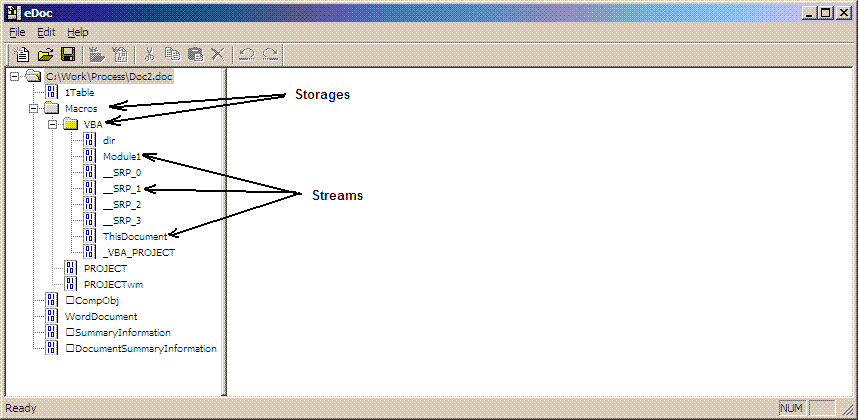 Figure 1
 shows the typical logical OLE2 structure of a document with a VBA macro in a module named “Module1”, as created by Microsoft Word. The subdirectory tree “VBA” is present in every VBA-containing OLE2 file (although the OLE2 file containing it could be itself compressed and inserted in the stream of another OLE2 file), while the other streams and storages are different, depending on the particular Office application that has created the document. For instance, Excel uses a storage named “_VBA_PROJECT_CUR” instead of “Macros” and a stream named “Workbook” instead of “WordDocument”. For the rest of this article, we shall concentrate only on the streams in the VBA storage.
2.2 Welcome to VBA
It is worthwhile to note that the problem we are going to discuss here exists only in VBA versions 5 and higher. VBA version 5 was introduced with Office 97. In the earlier versions of Office, only Excel supported VBA (version 3) and this problem did not exist there.
Let us take another look at Figure 1. The streams in the VBA storage can be into four different categories, depending on their contents.
The first category is the so-called module streams. There are two of them in our example – one named “Module1” and one named “ThisDocument”. A module stream is created for every single module that exists in the VBA project – no matter whether it is a regular module (like “Module1”), a class module (like “ThisDocument”), or a user form (no user forms are present in our example) – even if the module in question is entirely empty (like “ThisDocument” is, in our particular case).
The second category is the so-called execode streams. Their names always begin with “__SRP_”, followed by some number. We shall discuss the purposes and the contents if these streams later in this article.
The third category is the streams that contain directory information. There are two of them in our example – one, rather unimaginatively named “dir” and one named “_VBA_PROJECT”. These streams contain information about the names and properties of the modules that the VBA project consists of. Some other information is stored there too – for instance, the “_VBA_PROJECT” stream contains all the identifiers (subroutine and variable names) used in all modules, as well as the paths of all add-ins used by the VBA project. Although understanding of the structure and meaning of these streams is of vital importance for the purposes of proper macro virus detection and especially disinfection, it is not important for the purposes of this article – so we are simply going to ignore them.
Finally, the fourth category of streams are informative streams like “PROJECT” and “PROJECTwm” in our example. They contain information like whether the VBA project is password-protected (and, depending on the VBA version, the trivially encrypted password or a hash of it) and other such properties. They are similarly irrelevant for our purposes, so we are going to ignore them too.
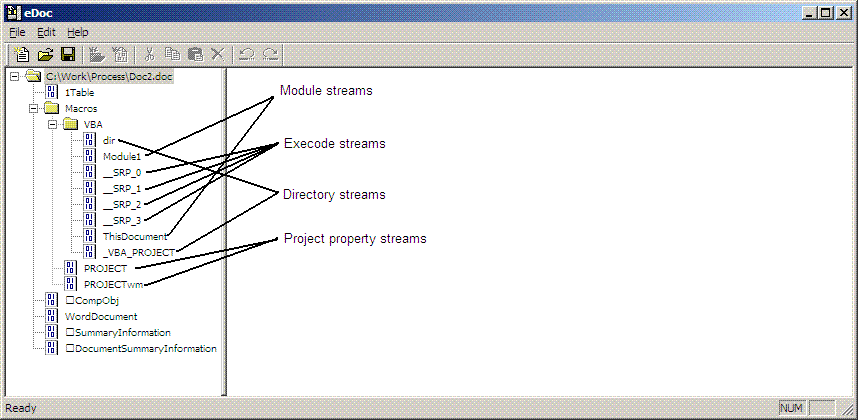 Figure 2
The various types of VBA-related streams are shown on Figure 2.
2.3 The Module Streams
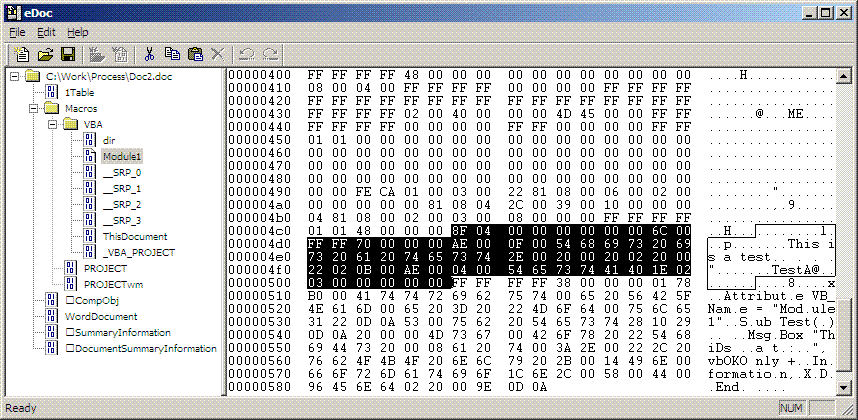
Part of the contents of a module stream is shown on Figure 3. The module stream contains two of the VBA forms (“faces”) that this article is talking about – the p-code and the compressed source.
2.3.1 The P-Code Area
On Figure 3 the p-code area is highlighted.
Figure 3
 It is outside the scope of this article to explain how exactly the p-code area can be located in a module stream. Much of the necessary information has been received from Microsoft under a Non-Disclosure Agreement (NDA) – so we wouldn’t be at liberty to disclose it anyway. Suffice it to say that all legitimate anti-virus developers who have signed such an NDA with Microsoft can receive this information.
It is similarly outside the scope of this article to give a detailed explanation of how to read (and make sense of) the contents of the p-code area. For more information on this subject, the reader is referred to [3]. Just for the curious among you, in our particular example the VBA macro in Module1 contains
Sub Test()
        MsgBox "This is a test.", vbOKOnly + vbInformation, "Test"
End Sub
and the p-code highlighted on Figure 3can be read as follows:
8F 04 00 00 00 00 ; Sub Test(). "0x00000000" is a pointer to
;    a structure, describing the subroutine's
;    name and parameters.
00 00 ; Filler. Each p-code line is padded with
;    garbage, so that the number of bytes it
;    consists of is always a multiple of 8.
6C 00 ; End Sub. The p-code lines don't have to
;    be physically in order. Their logical order
;    is described elsewhere in the module stream.
FF FF 70 00 00 00 ; Filler
AE 00 0F 00 54686973206973206120746573742E00 ; "This is a test."
;    Strings are padded with a zero, if necessary,
;    so that their length is always a multiple of 2.
20 00 20 02 ; Load the identifier "vbOKOnly". "0x0220" is a
;    reference to the actual identifier, which is
;    stored elsewhere (in the _VBA_PROJECT stream).
20 00 22 02 ; Load the identifier "vbInformation".
0B 00 ; +. The p-code interpreter is a stack machine
;    and works in Reverse Polish Notation - i.e.,
;    the operands are followed by the operator.
AE 00 04 00 5465737441 ; "Test"
40 1E 02 03 ; Subroutine call to MsgBox. Again "0x0302" is
;    a reference to the table of identifiers in
;    the _VBA_PROJECT stream.
00 00 00 00 00 ; Filler
2.3.2 The Source Code Area
Almost immediately after the p-code area, each module stream contains a source code area. The latter, unsurprisingly, contains the source code of the VBA program that resides in the module. The source code area is compressed using Lempel-Zev compression, which is why it is not immediately readable – but it is nevertheless easily recognizable by visual inspection.
Figure 4
Figure 4 shows, highlighted, the source code area in the module stream (“Module1” in our example).
2.4 The Execode Streams
As mentioned earlier in this article, the execodes reside in the __SRP_ streams. They are the third “face” (i.e., executable form) of a VBA program – besides the p-code and the source code. (We shall explain why the source code is “executable” in section 3.)
Unfortunately, very little is known about the exact purpose and format of the execodes. And Microsoft hasn’t been exactly forthcoming on this subject, either. Which, in practice, means that they have steadfastly refused to provide us any information whatsoever on this subject. Not because of malice and intentional secretiveness, of course, but simply because they do not have such information, surprisingly as it is. As a rule, Microsoft does not document internally the formats they develop. Instead, they document the API calls necessary to access them. While this might make sense in a Windows-oriented environment, it is rather useless to those of us who have to develop and support multi-platform anti-virus programs.
So, the little information we have about the execodes streams has come from reverse-engineering. Unfortunately, given that this form is almost never used (see the next section), our efforts in this aspect have always had a somewhat lower priority. And, since we’ve always had enough higher-priority Microsoft things to reverse-engineer, this means that we don’t really know much on the subject of execodes formats.
What we do know is that the module named “__SRP_0” is a special one. It seems to contain, among other things, all literal strings used in all VBA modules of the VBA project. Part of the contents of this stream in our particular example is shown on Figure 5.
Figure 5
We also know that every module stream has its separate corresponding __SRP_ execode stream – although we don’t presently know how exactly to determine which execode stream corresponds to which module stream, and we don’t know what is the purpose of the additional execode streams.
The contents of the execode stream corresponding to the “Module1” module stream in our example is shown on Figure 6. If you cannot make sense of it – don’t worry, you are not alone.
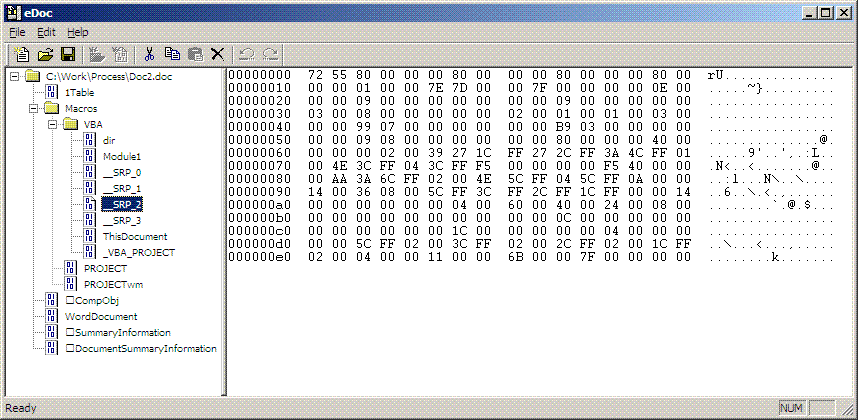 Figure 6
We don’t reliably know even how to locate the beginning of the actual execodes in the execode stream – although we have developed a set of heuristics that seems to work reliably most of the time. What we do know, however, is that each subroutine or function of a module has its own area in the execode stream. These areas are adjacent and in the order in which the subroutines (or functions) appear in the module. Somewhere before them in the execode stream there is a two-byte word, containing the number of such areas – it is at offset 0x003C in the “__SRP_2” stream in our particular example and it contains 0x0001, for the “Module1” stream contains only a single subroutine (“Test”). The corresponding single execodes area begins at offset 0x005A in the “__SRP_2” stream in our particular example.
Each such area seems to begin with two four-byte fields ([4]). The first field seems to contain the full size of the area (0x00000080 in our case), while the second one seems to contain the size of the non-variable part of it (0x00000040 in our case). This non-variable part is always located at the beginning of the area that corresponds to a particular subroutine or function. The rest of the area is the variable part – called like that because its contents seems to be variable, although we don’t have the slightest clue how to interpret it. In fact, we are not completely certain even that the contents of the so-called “non-variable area” is, in fact, always constant.
That, I am afraid, exhausts all that we currently know on the subject of the format of the execodes streams.
2.5 Piecing It All Together
Most of the time, it is the p-code area that is actually executed when a VBA program is run. The execodes are not even always present – the streams containing them can be safely deleted and the VBA program will still run without any problems. The source code area can be modified with a hex editor, so that its contents does not match what the p-code says (for instance, we could patch the “T” to “P” at offset 0x054E in the stream named “Module1” in our example) – and, if the patched macro is run, it will be the contents of the p-code that will be executed. Worse, if you open the patched document with Word and inspect its VBA module with the VBA Editor, you will not see any effects from the patching – meaning that the VBA Editor cheerfully ignores the compressed source and de-compiles the p-code into what it displays.
So, seemingly, neither the source code, nor the execodes are of any importance and one should concentrate on the p-code alone when scanning for VBA macro viruses. At least this is how we reasoned at the time and this is what most scanners were doing.
Still, when Microsoft provided us with whatever limited information they did on the subject of VBA, they explicitly told us two things. First, they told us to decompress the compressed source code area and to scan that. Second, they told us that, when disinfecting a VBA macro virus, we should delete all __SRP_* streams that are present.
Of course, true to their usual Microsoft way, they didn’t explain us what the reasoning behind these two recommendations was. However, by that time we had become accustomed to stupid ideas coming from Microsoft where viruses and anti-virus programs were concerned, so most of us (me included) told Microsoft to concentrate on answering our questions and refrain from teaching us how to do our job. We also proceeded to cheerfully ignore these suggestions of theirs – although not all anti-virus companies handled them in the same way. Some (very few) products implemented both of them, some implemented only the first, some – only the second, and some (again very few) ignored both of them.
I was responsible for implementing the macro scanning engine in our product and I took the decision to ignore the first suggestion but to implement the second one. My reasoning was that, since the p-code was clearly what was executed, it made most sense to scan it instead of anything else (e.g., the source code). I also decided to implement the second suggestion (removing the __SRP_* streams when disinfecting) – mostly because I could and didn’t see any harm in doing so.
Much later, we discovered that, for a change, there had been an excellent reason behind Microsoft’s suggestions. As it turns out, the algorithm used by VBA to interpret the p-code, the source code and the execodes is as follows:
IF (the execodes exist) AND
(the execodes are created by exactly the same version of VBA as the one opening the
VBA project)
THEN
use the execodes
ELSE IF (the p-code is created by the same version of VBA as the one opening the VBA
project)
THEN
use the p-code
ELSE
use the source code
END IF
A few explanations of the above algorithm are in order:
-
By “exactly the same version”, I mean just that. For instance, even the same version numbers of Windows Office and Mac Office do not have “exactly the same version of VBA”, because one of them uses little-endian byte format and the other uses a big-endian one.
-
By “the same version of VBA”, I mean just the same version number. For instance, both Office 97 for Windows and Office 98 for Macintosh use the same version of VBA – namely, 5.0.
-
The execodes seem to be some kind of memory dump of the structures that the p-code interpreter creates in memory when loading the p-code instructions. Since we don’t really know what exactly the execodes are, you’ll have to use your imagination regarding what exactly “use the execodes” means.
-
By “use the source code” I mean “decompress the compressed source code area in memory, compile it into p-code, and start interpreting that p-code.
Why such a convoluted algorithm? Presumably, the purpose of the execodes is to speed up the loading and execution of the p-code. They don’t have to be present and, even if they are present, they will not be used, if the document containing them is opened with a different version of Office – but if they are present and if the document is opened by exactly the same version of Office as the one that has been used to create it, the execodes will be used and (presumably) will load and run faster than interpreting the p-code directly. The execodes will be present only if the document containing the VBA project is saved after the VBA code in it has been executed at least once. Depending on how exactly a macro virus works (i.e., whether any of the viral code in the newly infected document is run or not before that document is saved), some of them will always contain execodes in their VBA project and some of them never will.
The reason for the presence (and usage) of the source code is a completely different one. It provides compatibility between the different VBA versions. For instance, VBA version 6.0 (used in Office 2000 and above) is slightly different (it has some additional p-code instructions) from VBA version 5.0 (used in Office 97). If it weren’t for the source code, Office 2000 wouldn’t be able to execute directly any macros in the Office 97 documents it opens – because the opcodes of the p-code instructions would be different and incompatible. Instead, it would need a special upconversion program – pretty much like Office 97 has, in order to be able to execute VBA version 3.0 macros from Excel 95 documents. Furthermore, as new versions of VBA are introduced, the number of such converters would have to increase exponentially – in order to cover all possible up- and downconversions between the various existing VBA versions.
Yet with the algorithm described above, the problem of multiple converters is solved in a very elegant way – namely, none are needed. If a document, containing a VBA macro, is opened with a version of Office that contains a version of VBA, different from the one that has been used to create the macro in the document (no matter whether it is a higher or a lower version number), the source code area in the module stream(s) will be simply decompressed, recompiled and the result – executed. There is no need for p-code up- or downconversion; the existing p-code is simply ignored and is re-created from the source.
It is a very elegant solution to a rather difficult problem. Unfortunately, whoever came up with that solution at Microsoft clearly wasn’t thinking in the same terms as the designers of the anti-virus programs are thinking. As a result, the solution created a completely different set of problems.
3 The Executable Source
If we consider carefully the algorithm outlined in the previous section, it will become obvious that in some circumstances (i.e., when a document, containing a VBA macro is opened with a version of Office that uses a version of VBA, different from the one that has created the macro), the contents of the source code will control what actually gets executed – not the contents of the p-code. This causes two different problems, from the point of view of the developer of anti-virus programs.
First of all, it means that those anti-virus programs, whose designers followed Microsoft’s advice to scan the source code, would have achieved a level of “upward compatibility”, similar to Office itself. That is, as the p-code of e.g., an Office 97 virus is upconverted to Office 2000 form, such anti-virus programs will continue to be able to detect the virus without any problems – while the anti-virus programs that look exclusively at the p-code would be forced either to treat the upconverted form as a different virus (even if they report it under the same name), or would have to resort to on-the-fly p-code conversion, using the methods outlined in [3].
Of course, this does not mean that scanning just the source code is the only right way to proceed. Anti-virus programs that do so are vulnerable to a different kind of problems. For instance, a virus writer could wipe (or otherwise modify), either manually (e.g., with a hex editor) or programmatically, the source area of his virus. As a result, the anti-virus programs that scan only the source code area will be unable to identify it. Of course, it would also mean that the virus would run properly only under the same version of VBA as the one that has created it – but virus writers are rarely concerned too much about compatibility issues; usually they find it “good enough” if a virus can execute properly only under a single widely used platform.
The second problem created by the fact that the source code controls, under some circumstances, what is executed, is related to disinfection. The early versions of the anti-virus programs that looked only at the p-code area also disinfected VBA viruses by wiping only the p-code area and leaving the source code area intact. This had some unpleasant consequences. First of all, it meant that all anti-virus programs that looked at the source code instead continued to report the disinfected documents as still containing the virus. Second, meant that if the “disinfected” document was opened under a different version of Office, suddenly the virus would re-appeared in it, seemingly from nowhere. This is why nowadays the anti-virus programs (even those of them that still look mainly at the p-code area) either remove completely the module streams that belong to the virus, or wipe both the p-code and the source code areas in them.
All these problems forced me to make some modifications to our macro virus scanner. It still looks mainly at the p-code area – because, most of the time, this is precisely what gets executed. However, I introduced a new heuristic. Now, if the p-code area is missing or empty, but a sufficiently large source code area is present, our scanner would report the document as “possibly misdisinfected” – hinting that probably somebody’s scanner has not bothered to wipe the source when disinfecting a virus.
The virus writers are clearly aware of the problems caused by the fact that sometimes the p-code controls the execution and sometimes the source code does. For instance, the W97M/Class.EZ virus uses this fact to avoid being detected by scanners that look only at the p-code area. When infecting documents, it damages the pointers that are normally used to locate the p-code area in the module stream containing the virus. As a result, the scanners that look for a p-code area to scan are unable to find it. However, the virus also modifies one additional byte in the stream, indicating that the VBA project has been created by an impossibly high version of VBA – i.e., one which is different from all the existing ones. This forces Word (any version of it that supports VBA) to re-compile and run the contents of the source code area and, therefore, to execute the virus – despite that it wouldn’t be able to locate its p-code area.
4 Like a Jini from a Bottle
The fact that the execodes (as opposed to the p-code or the source code) can also control what is actually executed under some circumstances (i.e., when they exist and when the VBA project containing them is opened by exactly the same version of VBA as the one that has created it) creates its own set of problems to the anti-virus programs.
When I first became aware of this fact, I performed some experiments and reached the conclusion that, while this fact could be used to conceal a Trojan horse (e.g., by wiping or otherwise modifying its p-code and source code area, in order to make it undetectable with an anti-virus program that looks only at these areas), it could not be used to conceal a virus. My reasoning was that a macro virus replicates by basically saying “copy my module(s) from here to there”. However, if the module streams do not exist or are otherwise corrupted, they will be unable to copy themselves. As a result, the macro malware will be unable to copy itself – i.e., it will no longer be a virus. The malicious payload of a Trojan could still be active, however – even if present only in execodes form.
Unfortunately, my reasoning was proven wrong. Worst of all, it was proven wrong by a virus writer who was not even trying to do that – he was trying to solve a completely different problem.
The contents of a VBA project can be “protected” with a password. I have put the word “protected” in quotes, because the contents of the modules is not encrypted or anything like that – and it is, in fact, quite trivial to extract it with a third-party program, no matterr whether it is protected or not. The “protection” is basically a flag that tells VBA that the VBA Editor is not allowed to display the contents of the VBA project, unless the user supplies the proper password. (In VBA version 5.0 the password is stored, in a trivially encoded form, in one of the information streams, while in the later versions of VBA only a cryptographic hash of it is stored there.)
However, there is one additional restriction imposed on protected VBA projects – namely, the modules they consist of cannot be copied elsewhere. This restriction is quite natural – if it did not exist, people would be able to circumvent the protection trivially by simply writing a VBA program that copies the modules of the protected VBA project to a different VBA project that is not protected. However, the implementation of this restriction also means that a module, residing in a protected VBA project is not allowed to copy itself or any other module in that project. In other words, a VBA virus cannot reside in a protected VBA project, or it will be unable to copy itself in the usual way.
Of course, if the VBA project of the virus is not protected, it means that anyone could examine its contents with the VBA Editor – and this is exactly what some virus writers do not like. So, naturally, they sought ways to circumvent the restriction.
One possible way to circumvent it is to create a virus that does not try to infect other documents but which replicates by always sending one and the same document – the one, in which it resides. This sending can be performed by e-mail, by IRC, by crawling the network shares, and so on. But what if the virus writer wants his virus to be able to infect other documents?
Enter the X97M/Jini.A virus.
The author of this virus had a really “bright” idea. He probably thought “If a virus that resides in a protected VBA project cannot copy itself to other documents, can’t it copy other documents to itself, instead?”. And this is precisely what the virus does. It infects Excel workbooks – but it does not copy itself to them. Instead, it deletes all sheets from the workbook where it resides, then copies all sheets from the target workbook to the workbook where it resides, then closes and deletes the target workbook, and finally saves the workbook where it resides under the file name of the target workbook. All this hokus-pocus – just to be able to circumvent the restriction that modules, residing in protected VBA projects are not allowed to copy themselves elsewhere. However, the bizarre infection method used by this virus has some unintended consequences.
Obviously, at some point of time, a file infected with this particular virus had been disinfected by a scanner that knew the virus but which did not bother to remove the __SRP_* streams when disinfecting it. As a result, the module stream of the virus (with the p-code and the source code areas residing in it) was removed from the infected file – but the streams containing the execodes were left intact.
Had this happened to a “normal” virus, the result would have been unable to replicate – because execodes in the document would have tried to copy non-existent module streams. But the X97M/Jini.A virus does not try to copy any streams! Instead, it copies the data sheets of the target to the file where it resides and overwrites the target with that file. Since that file also contains the execodes, it means that the execodes would be able to replicate on their own – even without the presence of the module stream that contains the p-code and the source code. So, thanks to Microsoft’s reluctance to provide relevant information and to the sloppiness of some unknown anti-virus producer, we ended up with a macro virus that was undetectable both to the anti-virus programs that looked at the p-code and to those that looked at the source code – i.e., with the problem described in [1].
How to solve the resulting problem? My initial reaction was something similar to the heuristic described in section 3. That is, if neither p-code, nor source code was found, but any execodes were present, report the document as “possibly misdisinfected”. Unfortunately, this “simple” solution turned out being problematic on its own. Apparently, if an Excel spreadsheet contains some complex Web controls (like radio buttons, cheboxes, dropdown listboxes and so on), some execodes are generated in order to handle them – even though there isn’t any VBA program in the document. Since in such cases there is neither p-code nor source code but there are some execodes, my heuristic triggered, causing false positives. And such false positives were practically impossible to “fix” too – becase my way of fixing macro false positives is to create a special entry in our database, corresponding to some macro from the macro package that was causing the false positive. Then the scanning engine, when finding a macro described by this entry, simply suppressed the report from the heuristics. But in the cases we are talking about there were no macros whatsoever – so I could not create any special entries for them.
Eventually, I solved the problem by reverse-engineering the format of the execode streams to a certain degree, implementing a parser for them, and modifying our scanner to make it able to handle virus definition entries that describe not just p-code areas of macros but also execode areas. Unfortunately, I am not confident enough in the correctness of my reverse-engineering to document its results here. As mentioned in section 4, even locating the beginning of the actual execodes in the execode streams is based in a set of heuristics – not on an algorithm that is guaranteed to work reliably every time. But they seem to work reliably in most test cases I have been able to construct, and they definitely work reliably to detect all instances of the single execodes-only virus in existence, so for my purposes they are considered “good enough”. Of course, I will continue to research this issue, to improve my algorithms, and to press Microsoft for more information.
5 Summary and Conclusion
As we saw from the previous sections, beginning with Office 97, the VBA macros can exist in three completely different forms – any of which can dictate what would be actually executed at runtime, depending on the particular circumstances. In some obscure cases, the contents of these three forms might be expressing different algorithms – either intentionally, because of some trick used by the virus writer, or unintentionally, due to the sloppiness of some anti-virus program.
It is, therefore, imperative that anti-virus programs are capable of handling malware that exists in any of these three forms – even if any of the other two forms are not present or not malicious. At the same time, it is imperative that all the three forms are removed when a document containing macro malware is being disinfected.
References
- [1] Igor Muttik, “A Portrait of Jini”, Virus Bulletin, October 2000, p. 7.
- [2] http://www.etree.com/tech/freestuff/edoc/eDoc.exe
- [3] Vesselin Bontchev, “Solving the VBA Upconversion Problem”, Proc. 10th Int. Virus Bull. Conf., pp. 273-299.
- [4] Costin Raiu, personal communication.